12 Circle AI examples from real founders — that changed their businesses
Someone had Circle AI diagnose their entire community before building anything—and it found that 86% of their members had never posted. Someone else shipped a 36-lesson course, pricing and drip scheduling included, in under an hour. Someone built their entire founding-member launch system in under 25 minutes.
That's what happened when we opened the Build with AI community challenge alongside the Circle Eclipse launch: prompt Circle AI to build or create something, post your prompt and the result, and the best submissions would win a year of Circle Plus, a MacBook Pro, and/or AI credits.
To be honest: we expected volume because these prizes were the sweetest we’ve ever had. What we got instead was depth. People didn't just test the feature—they finally shipped the thing they'd been meaning to build for months, sometimes years, and were fairly open about it.
In this article, we're sharing some of the best builds from the challenge—organized by what you're actually trying to solve, not by who won what, so it's easier to find the one that matches your own to-do list.
Let's get into it.
How we picked the winners
Build with Circle AI ran for two weeks in our Build with AI community space for customers. We received 41 submissions that read less like contest entries and more like people publicly working through something they'd been putting off.
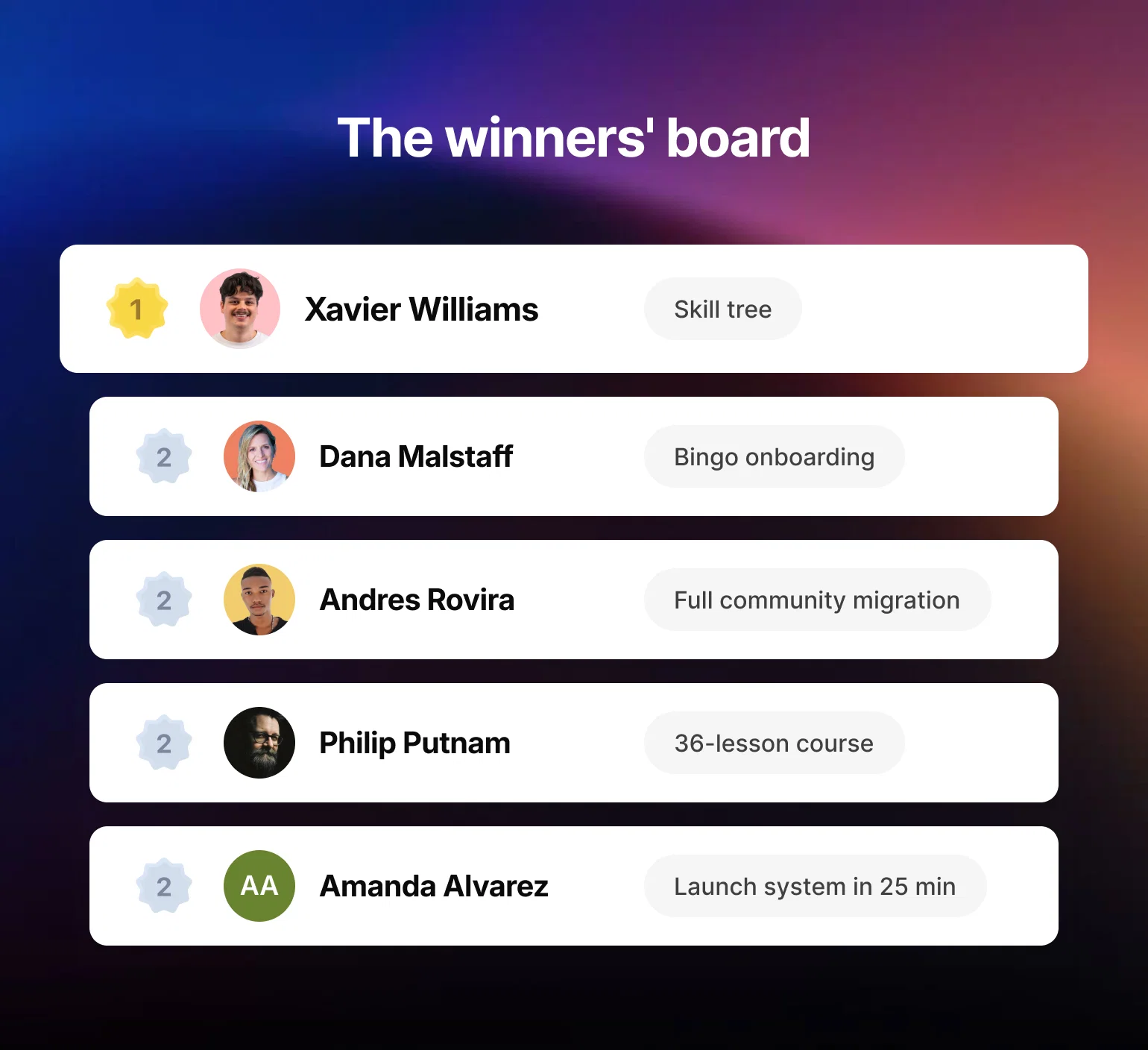
We picked winners across a few categories:
- Grand prize and runners-up, for the builds that most impressed our team on ambition and execution
- Most creative, most practical, best upgrade, boldest experiment, and community favorite, for standout builds in a specific lane
You'll see those placements tagged next to each name below—but we've grouped the builds themselves by job, so skip to whichever one matches what you're working on.
Turn quiet members into active ones
Whether it's brand-new members or a quiet majority who never got hooked, activation usually comes down to a clearer onboarding path—these two builds took very different routes to it.
1. Dana Malstaff — turned onboarding into a bingo game (Runner-up 🥈)
Dana runs BossMom, a community for moms building businesses (she also runs a marketing agency, Nurture to Convert). Her onboarding checklist worked fine—people finished it—but nothing brought them back afterward. So she built new members a bingo-style card with 12 actions to complete in their first two weeks (post an intro, share a testimonial, browse a resource), each one worth points. Those points feed her existing leaderboard, and leveling up unlocks real rewards: shoutouts, plus access to live trainings and micro-workshops inside her community.
In her own words: "We have an onboarding checklist, and people do finish it, but nothing pulls them back after that. Mom life gets busy. We needed something that brought members back over and over, not once."
Why it won: It gives an already-familiar mechanic, the leaderboard, something concrete to actually reward: the exact actions that turn a new member into a regular.
Try it yourself: List the 8-12 actions you most want new members to take in their first two weeks, then ask Circle AI to turn them into a bingo card that feeds your existing leaderboard.
2. Vojtěch Kašpárek — had Circle AI diagnose his community before building anything (Boldest experiment)
Before building anything, Vojtěch asked Circle AI to analyze his member data and answer with numbers only, no advice. It found that 86% of his roughly 205 members had never posted or commented.
In his own words: "In a community where 86% have never posted, a leaderboard doesn't activate the quiet majority—it just shows them how far behind they are."
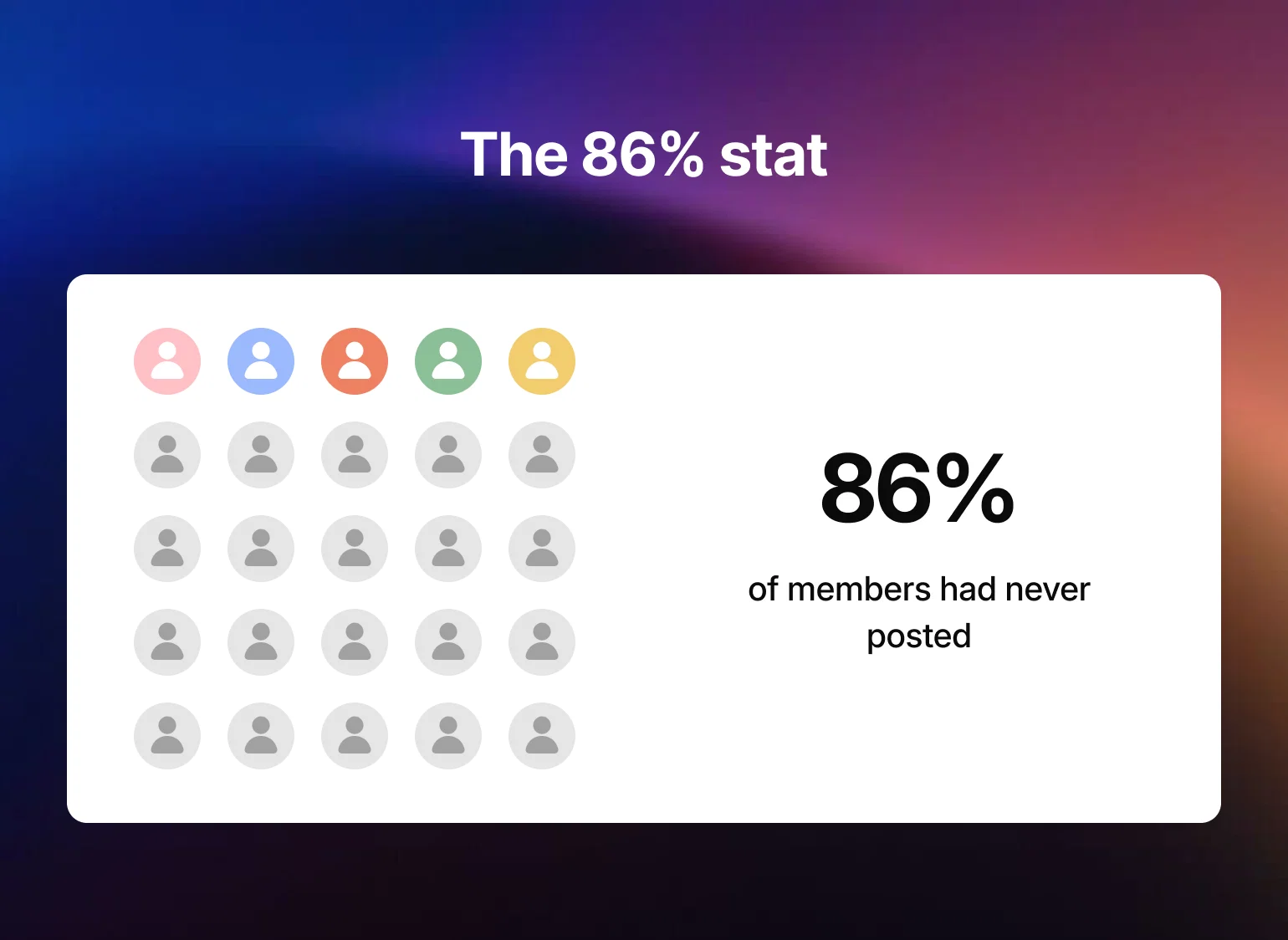
Why it won: Most people skip straight to building. Vojtěch's build is a good argument for asking what's actually wrong before you spend time fixing the wrong thing.
Try it yourself: Before building anything new, ask Circle AI to analyze your last 90 days of activity and report back numbers only—no advice, no suggestions—so you know what you're actually solving for.
Build, fix, or organize your content
This was the most crowded job in the challenge—no surprise, since AI-assisted course creation is where most people start when they first open Circle AI.
3. Philip Putnam — turned a 10-year dream into a 36-lesson course (Runner-up 🥈)
Philip and his wife Holly run The Cooking Family and had talked for almost ten years about turning her home-cooking lessons into a real curriculum. They finally wrote it this summer: 36 lessons across 9 modules for homeschool families. Setting it up in Circle was the part Philip kept putting off—modules that had to unlock on the right Sundays, quizzes, badges, a paywall with three payment plans, coupons, and access rules. He wrote up the outline as one long prompt and handed it to Circle AI.
In his own words: "Getting it set up inside Circle was the part I kept putting off."
Why it won: Course build-out is normally weeks of formatting, sequencing, and pricing decisions. Philip compressed all of it into a single working session—and finally shipped something he'd talked about for a decade.
Try it yourself: Write your full course outline as one long prompt—modules, unlock dates, quizzes, pricing tiers—and let Circle AI build the scaffolding in a single pass instead of piecing it together lesson by lesson.
4. Xavier Williams — turned 20 disconnected course guides into one skill tree (Grand prize 🥇)
Xavier ran Craft Club, a craft-brand community of 5,000 members with 20 separate course guides spread across 10 different crafts. Members would finish one guide and have no idea what to do next. His prompt asked Circle AI to design a three-tier progression—Foundations, Technique, Maker—for each craft, using member tags as state and access groups as the unlock mechanic, plus gamification and workflows to automate it: points per node, badges per tier, a leaderboard, and five plainly named levels a brand-new member could understand instantly.
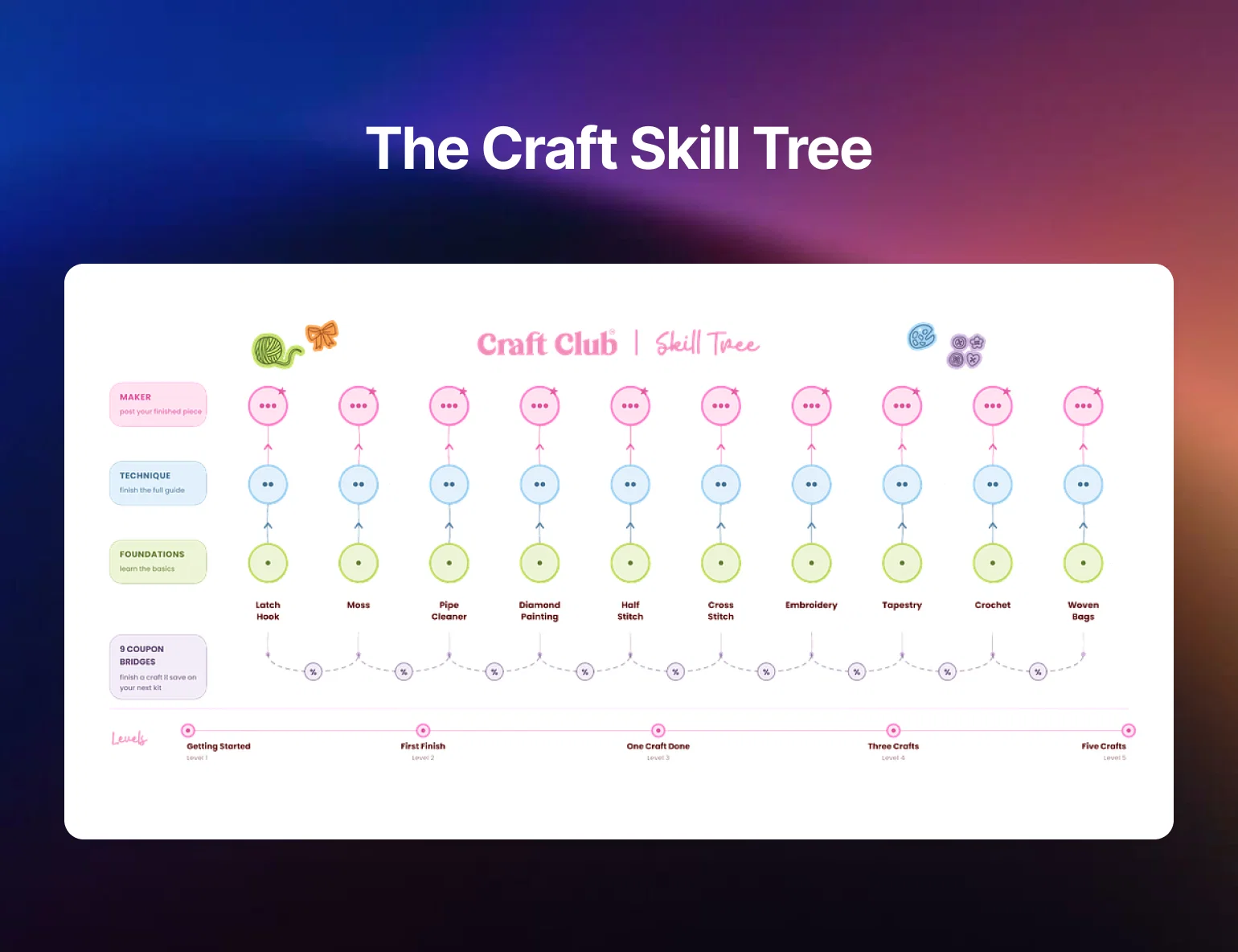
In his own words: "it worked out on its own that tags are the state, access groups are the locks, and workflows are the branch logic."
Why it won: It's the kind of restructuring project that usually sits on a to-do list for a year because it feels too big to start.
Try it yourself: Map your own content into 3 tiers, then ask Circle AI to turn member tags into the unlock states between them.
5. Xhico — gave an existing course a cohesive refresh (Best upgrade)
Xhico runs Studio Xhico where they teach design fundamentals and help creatives strengthen their process and practice. Their Brand Foundations course had been stitched together from lessons created at different times, so the lesson descriptions and structure never quite felt cohesive. Rather than rebuilding it manually, they used Circle AI to clean it up.
In their own words: "I was able to update an entire existing course in a way that would have been a pretty tedious project to tackle lesson by lesson on my own."
Why it won: Not every build is greenfield. Sometimes the win is making something you already shipped feel like it was designed as one thing.
Try it yourself: Point Circle AI at an existing course and ask it to standardize the descriptions and structure across every lesson, rather than editing each one by hand.
6. Laura Guilmain — one session reshaped 3 years of course content (Best upgrade)
Laura runs a 120-day program for women healing their relationship with food, their bodies, and themselves. It holds body respect and body change side by side, so the women who want both don't have to choose. She last recorded the program in 2023, and the three years since were spent running women through it, growing as a coach, and gathering ideas along the way: how to meet the modern learner, how to move through the depth of this work in a way that stays engaging. Some of those ideas were half-implemented. Most were still floating in her head. The open question was which ones were worth it, and in what order.
She expected Circle AI to hand her a tidy list of fixes. Instead, it used the program's own data to help her sort the core content from the bonuses and deep dives, tighten onboarding and the welcome experience, and rethink engagement across the member journey. 34 worksheets, along with the audios, meditations, and activations, were remapped to the emotional moment or purpose they serve rather than just the lesson they sit under. New DM sequences now meet members according to their level of support. In her own words: "All of it reads and feels like me. Nothing got flattened."
In her own words: "All of it reads and feels like me. Nothing got flattened."
Why it won: It's proof that an AI rebuild doesn't have to sand off what makes your community distinct.
Try it yourself: Ask Circle AI to map your existing content against what you originally set out to build—the gaps it surfaces are usually the real to-do list.
Also worth a look: Carla Biesinger runs a paid Circle community and used Circle AI to scan months of member questions from her group chat and live Q&A calls, pulling out the 10 most common ones with answers already given inside the community. In her words: "I'm turning that list straight into a pinned FAQ post... so new and existing members can self-serve instead of re-asking the same questions." And Amy and Nancy Harrington finally wrote the SEO strategy they'd been avoiding for two years, in about an hour.

Grab the prompts behind builds like these.
Launch or price something new
Getting a new membership tier or cohort out the door usually means juggling pricing, gating, and a dozen small setup tasks at once—these two builds compressed all of it into a single session.
7. Amanda Alvarez — built a founding-member launch system in 25 minutes (Runner-up 🥈)
Amanda, who runs The Cabri Collective, asked Circle AI to build everything her founding members needed in one conversation: a private Founders group, welcome resources, a group chat, and an automated onboarding drip.
In her own words: "In less than 25 minutes, Circle AI created a Founders group space, associated paywall, a welcome event, group chat, resource center with 4 posts and the option to upgrade to complete a drip schedule, and a feedback space."
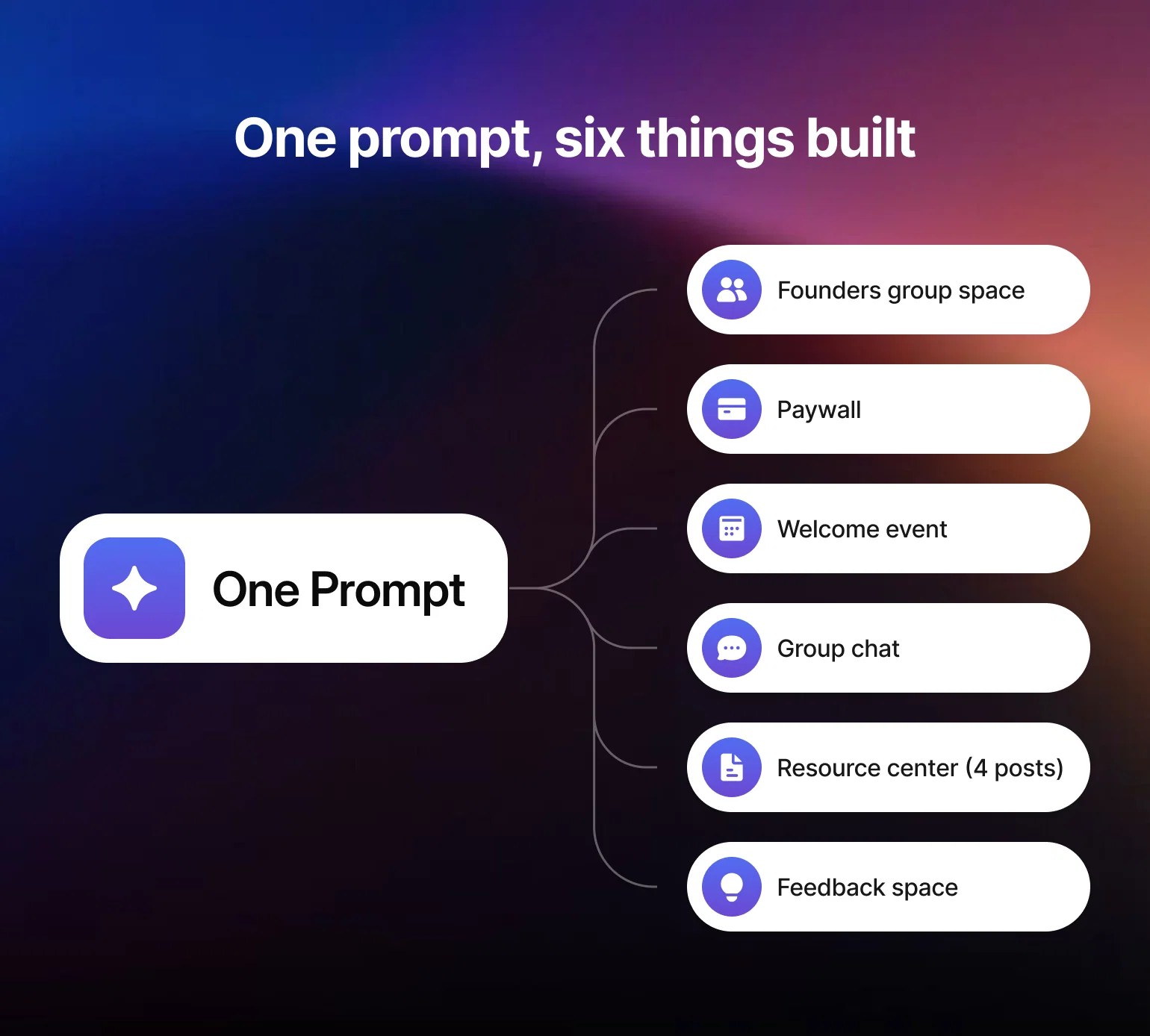
Why it won: Launch systems are high-stakes and easy to overthink. Amanda's build shows what "idea to ready-to-launch" looks like in the time it takes to get a coffee.
Try it yourself: Describe your founding-member offer once, in full detail, and ask for the whole system—space, paywall, drip, and all—in a single conversation instead of building each piece separately.
8. Beatrice Stonebanks — built 2 site builders and a full cohort in two days (Community favorite)
Beatrice is a longtime revenue consultant moving her CRO practice into community-based work. Her community, Boardroom Dominatrix, is built around consent-based, ESG-minded selling—the opposite of the aggressive, old-school sales tactics she spent her career around. Over two days, she used Circle AI to build two separate site builders—one for her consulting business, one for her community's entry tiers—plus a full 8-week paid cohort: a space group, course space, event space, chat space, and paywall, all linked and gated correctly.
In her own words: "I wouldn't have even tried without ongoing confidence boosters" from a fellow community member cheering her on mid-build.
Why it won: It's a full monetized program—pricing, gating, and all—built in a fraction of the time it would normally take.
Try it yourself: Describe your ideal cohort end-to-end—weeks, assignments, price—and ask for the whole build, gating included, in one request rather than piecing it together space by space.
Also worth a look: Sharee Collier built a full virtual summit to test-drive hosting her event inside Circle before committing to it for real.
Rebuild your structure at scale
Some rebuilds aren't about fixing one broken piece—they're about replacing an entire manual process with something repeatable, the same instinct behind mapping out what to automate first.
9. Andres Rovira — migrated an entire spiritual school onto Circle (Runner-up 🥈)
Andres runs Enseñanzas Saint Germain, a spiritual school teaching the "I AM" teachings. After years on Thinkific, where members experienced the school as little more than a course library, he asked Circle AI to design the complete structure using only Professional-plan features, organized around four layers: a daily path, a structured journey, a resource library, and community gatherings.
In his own words: "If you ask for structure, you get structure. If you want a product, you have to make the AI think like a product person first."
Why it won: Migrations are usually the project nobody wants to own. Treating Circle AI like a co-founder changes the math on whether it's worth doing at all.
Try it yourself: Before you migrate anything, describe your ideal member journey in one paragraph and ask Circle AI to propose the space structure first, using only the plan features you actually have.
10. Matteo Curto — rebuilt 30+ class groups in one afternoon (Community favorite)
Matteo's organization, Fondazione Libera Schola ETS, runs a homeschool academy in Italy that has to rebuild its entire class structure every year before lessons start—multiplied across 30-plus classes. His prompt turned that manual, repetitive setup into a repeatable pipeline: for every class going forward, Circle AI creates the space, matches students to existing members by email, generates a tagged invite link for new families, and publishes a pinned welcome post.
Why it won: It's unglamorous, high-volume, structural work—exactly the kind of task that's easy to keep delaying because it doesn't feel worth blocking out a week for. Turns out it didn't need one.
Try it yourself: If you rebuild the same kind of space every season or cohort, ask Circle AI to turn the setup into a repeatable template instead of redoing it manually each time.
Build something custom, no app required
These builds go a step past what AI can typically do for community builders—less "help me manage this" and more "just build the thing I'm picturing."
11. Annelie — built a standalone focus-sprint tool (Most creative)
Annelie built The Hideout for Unravelogue, her community of neurodivergent creatives: a self-contained focus-sprint app that lives directly inside a Circle post. Members open the post, run a timed work session, rate their focus before and after, and generate field notes to paste into a check-in space—no external accounts, no separate apps, no logins.
In her own words: "It's a single custom HTML block dropped into a Circle post—plain HTML, CSS, and vanilla JavaScript with no frameworks and no external dependencies."
Why it won: It's a genuinely original use case—not a course, not a launch system, but a standalone tool built for her own community's specific needs.
Try it yourself: If you have a specific member workflow in mind that no app quite fits, ask Circle AI to build it as a custom HTML block instead of hunting for a third-party tool.
12. Kaitlyn Faile — pushed back on what Circle AI said it couldn't do (Most practical)
Kaitlyn runs System Admin Insights, a paid community for HR technology practitioners. Three times, Circle AI told her something wasn't possible or wasn't wise—including that it couldn't watch a shared doc or read a list her team pasted somewhere, since workflows run on events, not passive monitoring. Each time, the redesign that followed was an improvement.
In her own words: "What I ended up building was smaller than what I asked for, and better."
Why it won: It's a useful, honest example: Circle AI isn't a vending machine that gets everything right on the first prompt. The best builds often come from a back-and-forth.
Try it yourself: When Circle AI says something isn't possible, ask what it would suggest instead—the workaround it proposes is often a better fit than your original ask.
What people said about it
The builds were the proof, but the reactions told us just as much. Rinata Tanks, of Purpose & Performance Coaching (P³), posted about trying Build with AI for the first time:
"Everyone was posting about Build with AI, so I figured I'd give it a try. And man, am I impressed! I was able to finish building out my membership group, audit my existing group beta program, and review my current paywalls, which, come to find out, I had set up wrong 😂 ... I honestly think the way I build in Circle moving forward will never be the same."
Carla Biesinger put it more bluntly:
"I'm getting slightly obsessed with Circle AI lol. I first used it to turn months of member questions into an instant FAQ + weeks of content."
Where these builds land on the AI spectrum
We've written before about the 6 ways AI actually helps community builders—moderation, onboarding, task automation, content creation, insights, and retention. Looking back at the challenge, it's a good gut check on where people actually reached for AI first, versus where the framework says they should.
Onboarding and activation dominated: Dana's bingo card, Amanda's 25-minute launch system, and Xavier's skill tree are all, underneath the specifics, onboarding problems solved three different ways. Task automation shows up in Matteo's repeatable class-group pipeline, Beatrice's linked-and-gated cohort, and Kaitlyn's push for something closer to a real workflow than passive monitoring. Content creation was the biggest bucket by volume: Philip, Xhico, and Laura all used Circle AI to build or fix a course, and Carla turned months of scattered questions into content in one pass. And Vojtěch's build is the clearest example of the insights function on the list—asking Circle AI to analyze activity and report back numbers only, before deciding what to build.
Two functions nobody touched: moderation and retention. No one in the challenge asked Circle AI to help them scale content review or catch a member before they cancel—worth keeping in mind as more of these communities grow past the size where a founder can read every post themselves.
And two builds didn't fit the framework at all. Annelie's Hideout and Andres's full community migration aren't really "management" tasks AI assisted with—they're closer to using Circle AI as a builder in its own right, which is a different job than the six above.
Your build starts with one prompt
Every project on this list—the skill tree, the 36-lesson course, the community diagnosis—started the same way: someone typed one specific prompt into Circle AI. You don't need to reverse-engineer them from scratch.
We've pulled together 268+ tested prompts for community builders, including several inspired directly by the winners in this article, in our free AI Prompt Library. Filter by what you're trying to solve—onboarding, engagement, monetization, retention, and more—and use the ones that fit.
Start a new business with one prompt.
FAQs about building with Circle AI
What is Circle AI?
Circle AI is an admin-facing assistant built into every Circle community. It can draft content, build out spaces and courses, set up paywalls, analyze community activity, and more—all from a single conversation, using context it already has about your community.
What was the Build with Circle AI challenge?
It was a community challenge we ran alongside the Circle Eclipse launch, open to any Circle community builder. Participants used Circle AI to build or create something in their own community, then posted their prompt, their process, and the result in our Build with AI space for a chance to win prizes.
Where can I find prompts like the ones in this article?
Our AI Prompt Library has 268+ free, tested prompts for community builders—including several inspired directly by challenge winners—organized by category so you can find the one that matches what you're trying to do.
Is there another Build with AI challenge coming?
We're actively looking at ways to keep the momentum going, including an ongoing prompt-of-the-week or quarterly community showcase. Keep an eye on the Build with AI space in the Circle community for what's next.
Community Content Marketer
Arina is Circle’s community content marketer, sharing insights on community growth, GTM strategy, and storytelling for solopreneurs.