TL;DR:
- AI features can make a member feel served or just processed, and that difference is what decides whether they stay.
- There's a simple test for drawing the line: member value comes before technical capability.
- AI should extend your community, not replace the parts of it that made members join in the first place.
You've been on the receiving end of obvious(-ly terrible) AI. The email that goes "In today’s fast-paced digital world…” and ends with “This isn’t X. It’s Y."—common “AI-isms” that people have learned to spot from a mile away. The auto-reply that thanks you warmly for feedback you never gave. The one that calls a billing problem "a fantastic opportunity to level up your journey." You can hear it the second it starts talking, and your trust erodes at the same speed.
The people in your community hear it too — the exact moment your AI misses the mark.
There are serious pros to using AI in your community, and real cons right alongside them. This article covers how to get the most out of the pros while steering clear of the cons—with a simple member-value test for telling them apart.
The pros: a better member (and admin) experience
Used well, AI makes the member experience better. It answers faster (than you!), points people to the right thing sooner, and quietly removes the small frictions that would otherwise have someone drift away (like not keeping up with their cohort, not getting a response to their questions, or missing events they were excited about).
Instant answers that keep members from getting stuck
The best AI in a community is invisible — members just notice the friction that used to be there is gone.
- A member hits a wall on lesson four at 11pm and gets an accurate answer in seconds instead of a two-day wait because you’re out of town. (Bonus? You get to actually take a break!)
- A question buried in a busy thread gets a response before it drops off the feed.
- A resource from a year-old discussion gets recommended the moment someone needs it.
The member doesn’t think "wow, what a great AI experience." They think the community just works.
Speed is the part members openly value, and the business case behind it is well documented. Faster-growing companies pull 40% more revenue from getting the right thing to the right person at the right moment, and 71% of consumers now expect that kind of personalized response as the baseline, not the exception.
That expectation lines up with how people judge AI more broadly: they tend to accept AI-produced content when it's doing a job they wanted done. For a member working through your material on their own schedule, an instant, accurate answer when they're stuck beats a polished one two days later.
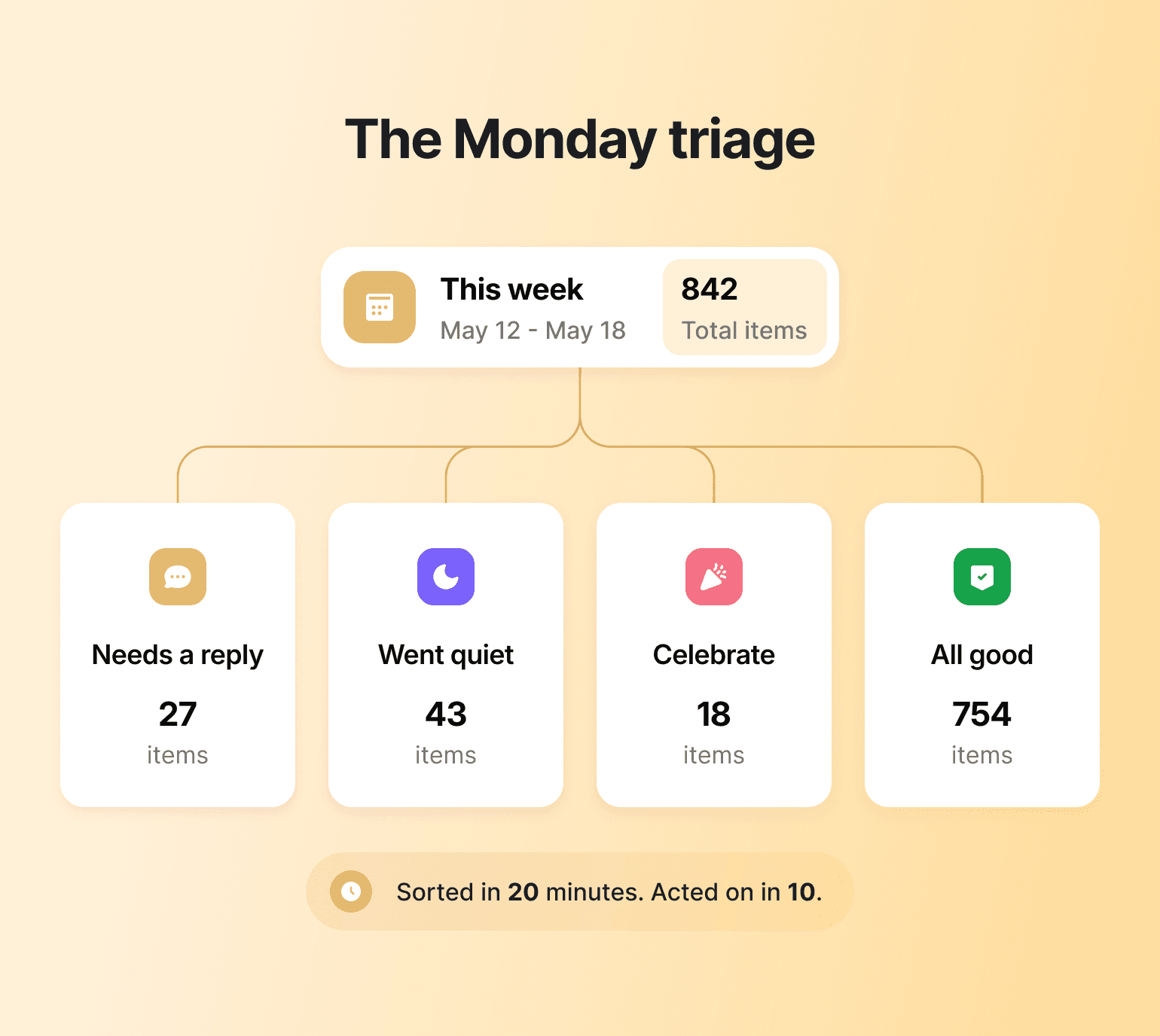
Community tip: Rachel Starr, a community strategist and founder of CoCreator Society, runs a version of this every Monday — an AI-sorted recap of the week's activity so she knows what needs her first. For the full four-bucket breakdown and how to set it up, see how to build a leaner creator business with AI.
Smarter AI Agents that personalize answers around your work
The other thing members notice is whether the answer actually reflects what you teach, and whether it accounts for where they personally are in it. A useful AI reply points to the right module in your course, surfaces the resource you'd have linked, and stays coherent when the member asks a follow-up question.
A useless one gives them a paragraph they could have gotten from any search engine—and once that happens, members have a reason to doubt the rest of what you sell. This is why personalization matters as much as training data: inside Circle, AI Agents train on your own courses, posts, and frameworks, so answers come back in your voice and with the member context you choose to give them.
Community tip: Point your AI Agent at what you already know about each member. On Circle, you can set your Agent to read members' profile fields instead of running on generic prompts. John Meese, founder of SOLD OUT Coach Club, had clients fill in two custom profile fields about their goals before a workshop. The Agent then used those answers to help each member refine their own goal into something sharper before he stepped in with his own coaching.
The result? Every member showed up already a step ahead, having worked through their own thinking first instead of starting cold—and it also erased the most common complaint he used to get, that chats with the AI coach had no context or history. As he put it, "It was like a dozen clients getting personal coaching."

Trained on your work, not the web.
Member matching that turns a directory into connections
The third win is the one members credit to the community itself, not to any feature: the sense that the right person or conversation found them at the right moment. The thread from six months ago that answers the question they're about to ask. The member three time zones away working on the exact problem they're stuck on, surfaced as someone to talk to instead of a name buried in a directory. Specificity makes your AI sound like you; relevance makes your community feel like it knows who's in it.
In Circle, Connect provides the baseline matching and connection system automatically, while AI can help with tagging and additional sorting.
Done right, this is what turns a roster into a community: members start talking to each other instead of just to you—which is when a community stops depending on the founder to stay alive. Fifty410, a telehealth GLP-1 clinic, built its entire patient community on Circle around that kind of member-to-member connection: with 40,000+ members, more than 80% of engagement now happens on mobile, and comments rose 5.5% quarter-over-quarter after the community moved into its branded app.
Community tip: Linart Seprioto's team at Circle Studios used AI to solve exactly this — reading every intro post in a 1,300+ member community and suggesting matches in a fraction of the time manual matching would take. See the full breakdown in how to build a leaner creator business with AI.
The cons: AI that makes members feel processed
Wrong answers, wrong timing, and over-automation all do the same damage: they erode connection. The member starts to feel like the system is processing them on your behalf, instead of paying attention on your behalf, and that's the feeling that costs a paid community its welcome and its trust.
AI accuracy makes or breaks member trust
A wrong answer doesn't just fail the member who asked it. In a global Forrester study of more than 1,500 chatbot users, 30% of consumers said a bad chatbot experience would push them to look at a different brand, abandon the purchase, or warn friends and family off—and half said they often feel frustrated dealing with one. Users rated their chatbot history just 6.4 out of 10, with nearly 40% of interactions landing as negative.
In digital communities—whose claim to fame is true connection and transformation, just with a screen—this cost is even more expensive, because the bar is so high.
A wrong answer doesn't stay contained to the moment it happens—it drags down how members judge everything around it, including your community business as a whole. In Trustpilot's 2025 analysis of more than 330 million reviews, reviews mentioning AI averaged just 1.7 stars, against 3.7 for those that didn't, with the top frustration being AI that gets in the way of reaching a human. The bot that fumbled a question last week colors how members read every AI-assisted reply they get from you afterwards. Accuracy isn't a nice-to-have you can trade for coverage—because the cost of a wrong answer compounds on every interaction that follows it.
Community tip: Give your AI Agent a visible "I don't know that yet" exit. In Circle, you can configure your Agent to hand off to a human when its confidence drops or a member asks the same question a second time, and tell members that's how it works.
Threads that need you pause for your input in the unified inbox and hand back to the Agent once you've replied, so nothing sits unanswered while it waits on you. A short pinned note in your help Space ("The agent answers what it's been trained on. When it's not sure, I take over within the day") turns a possible miss into a transparent handoff, and members stop reading silence as a failure.
The member moments you should never automate
The other failure mode isn't about whether the answer is right. It's timing.
When AI shows up in a moment that needed a human, the member can tell. And oftentimes, remember the frustration of their interaction well past the initial moment. The canned "you didn't finish that module!" nudge that lands the week after they finished it. The bot that answers warmly in a thread where a member was clearly reaching out to you, by name. The automated "how's it going?" check-in that arrives the same week someone emailed you that they're thinking of canceling.
This one matters most because the core product of a paid community is connection, and AI in the wrong moment works directly against it. In a 2025 survey of over 1,000 consumers, 86% said empathy and human connection matter more than a quick response—only about one in five put speed first. So a bot that's fast but arrives where a person was wanted doesn't read as efficient; it reads as the company opting out. Your members are partly paying for access to you, a real person making real judgments at the center of it. Simulated care, dropped into a moment that needed real care, doesn't read as a clever shortcut. It reads as evidence the relationship was never the point.
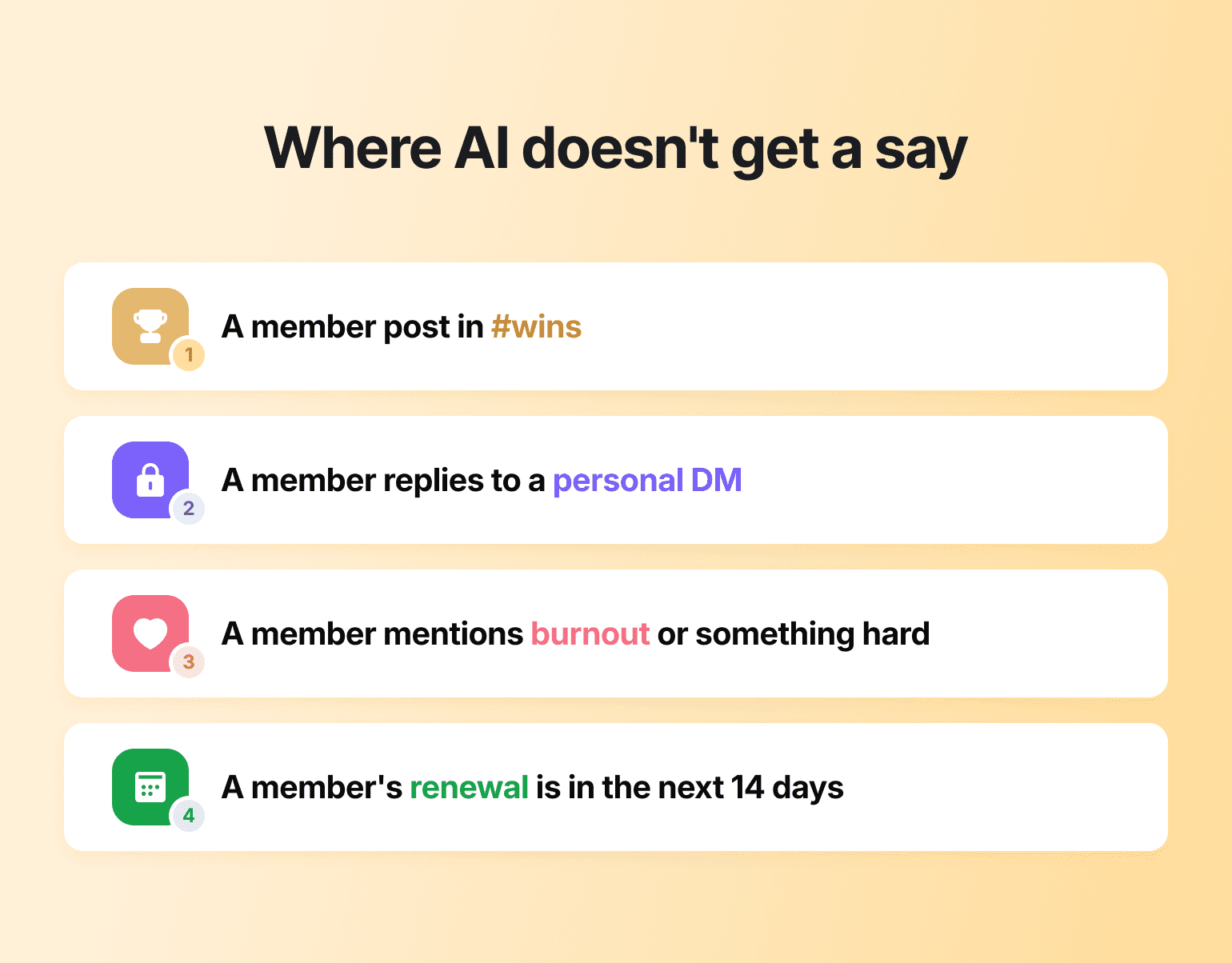
Community tip: Build a "hands off" list before you build the automation. Write down the three or four moments where you want the AI to stay out entirely—a member posts in #wins, a member replies to a personal DM from you, a member mentions burnout or something hard, a member's renewal is in the next 14 days—and set those as exclusions in your Circle Workflows and AI Inbox keyword rules. Automation handling 90% of the volume is a feature; automation showing up in the 10% that needed you is the whole problem. Decide the 10% in advance and the line enforces itself.
Using AI to protect human judgment, not replace it
Your calendar should not decide the line of when to use AI and when to not. The temptation is always to automate the moments that cost you the most time, but the member doesn't feel your time. They feel whether the moment that mattered was handled by someone that understood it.
A smarter use of AI is to point your human attention at exactly those moments: surface the urgent conversations early, then jump in where a personal touch matters most—the relationship work that no tool does for you. That's the trade worth making: time AI gives back doesn't have to disappear into more admin. It can come back as the welcome that actually lands. Circle's community masterclass with Jay Clouse goes deep on that side of the craft.
How to draw the line on AI in your community
The pros and cons of AI in community engagement sort by one question: does a member walk away feeling better served, or just processed through your to-do list? If you choose right, AI can extend everything good about your community; get it wrong and it cheapens the thing members joined for and could harm your brand perception overall. The test holds at every scale—would they feel more valued or less if they knew?
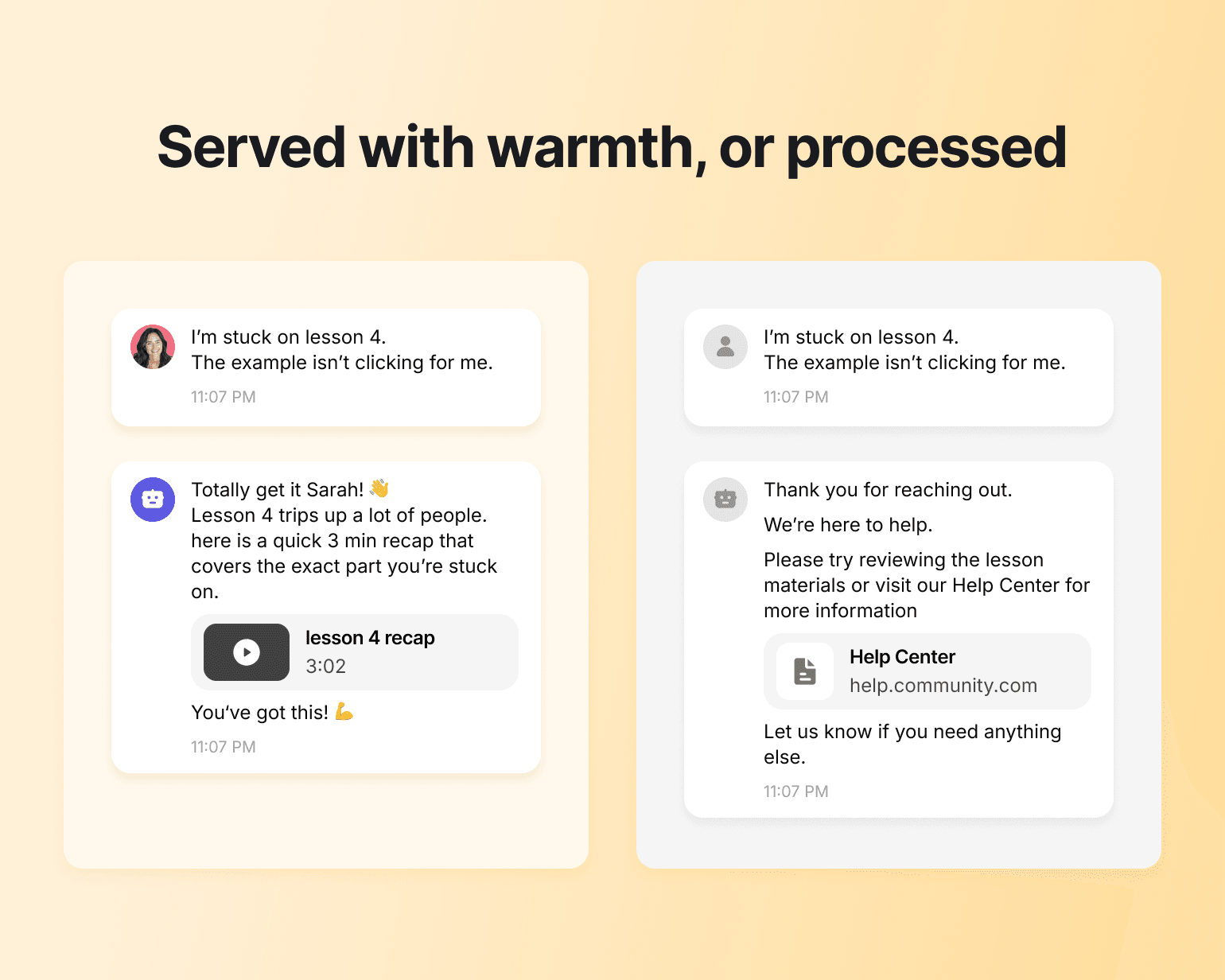
With Circle, you hand the late-night lookups and repetitive questions to AI Agents while keeping the conversations that build belonging in your own hands. That's the line Circle AI is being built around: an operational layer that scales your reach without scaling you out of the relationship.
Served, not just scaled.
AI in community engagement FAQ
Will members always know when I'm using AI?
Often, yes. Some members notice AI tells like generic phrasing and replies that don't address what they asked. Tell members where AI helps, and reserve the human moments for real humans.
What are some examples of AI in community engagement?
Common ones include an AI Agent that answers member questions from your own course and post content, automated onboarding that routes new members to the right Space, AI summaries of long threads, and member-matching that suggests who a newcomer should meet. The pattern that works: AI handles the lookup or the sorting, and a human still makes the call that involves judgment. If you're weighing platforms, see how they stack up on AI tools for community engagement.
How do I know if AI is working in my community?
Watch member-side signals, not just time saved. Response times on member questions, the share of questions resolved without a human stepping in, intro posts that get replies, and renewal rates are the ones that tell you whether members feel better served. If hours saved go up but engagement or renewals slip, the AI is doing the operator a favor at the member's expense.
How do I use AI without sounding generic?
Train it on your own content and frameworks. An agent trained on your methodology and writing answers in your voice extends your expertise and keeps the answers specific to your work.

Head of Product Marketing
JK Sparks is Circle's Head of Product Marketing, shaping the positioning, messaging, and go-to-market strategy behind the company's biggest product launches.