How to manage your online community as a creator
TL;DR
- Once a community is live, the work shifts from building to maintaining.
- A weekly routine keeps members engaged without requiring you to be online every hour of the day.
- A few clear metrics and a quarterly feedback loop tell you what's working, what's not, and what to change next.
Members only
One issue, five minutes, every Tuesday. Read by +14,200 creators.
You spent years building an audience—an email list, a YouTube following, a course that sold. Then, you launched a community to bring those people together in one place. The first week felt electric: introductions flying, threads buzzing, members thanking you for building a space they'd been looking for. Now the feed is quiet. A few loyal members still post, but most people haven't come back past the first few weeks.
Building momentum before you launch is one challenge, but keeping it going is a completely different one. Sustaining engagement month after month takes a system, and when you're running things solo (or even with some part-time help), that system usually defaults to you doing everything by hand until you burn out.
This guide walks you through six engagement and management systems that keep your community active without putting all of it on your shoulders, so you can spend your time on the work only you can do.
The 6 community management systems creators rely on
1. Audit whether your space is optimized for your promised transformation
Start with the question every other decision depends on: what specific result did you promise when you put your name on this? If that core promise was never nailed down, that's the place to start.
Re-read it as a member who joined last month would, and check that your most active spaces and events still help people reach that outcome.
We see communities drift here all the time, with a new area added and a weekly call dropped, until the day-to-day experience no longer matches the promise on your sales page. If a coaching community promising "your first three clients in 60 days" has off-topic chatter up top and the content that actually helps members win clients buried behind a different channel, members stop seeing (and working toward) the result they paid for, and they leave.
Check that your culture still matches what you want
Your culture is whatever the last month of posts actually shows—not what your guidelines say. Read the room: is the tone welcoming? Are members still helping each other? Or has it slid into all questions, no responses, unshared wins, or self-promotion in every thread?
Community tip: One of the best ways we track culture in our own customer community is by watching three numbers at once:
- Comments per post — tells you if people are posting into a void.
- Member-to-member reply rate — tells you if the community is self-sustaining or entirely dependent on you to respond.
- Which topics keep surfacing in Q&A — especially the ones that repeat week over week — tell you whether your content and programming are actually addressing what people need.
If those three are healthy, culture usually is, too.
2. Identify if you have an onboarding gap that members fall into
A member decides whether a community is for them in their first days, long before they've seen most of what you offer. That makes your onboarding the highest-return thing you can work on: not a launch task you finish once, but the part of running a community that determines how many of next month's sign-ups are still around next year. Our community benchmark data shows members who get a thoughtful welcome become active about 2x as fast. Pull your last 20 sign-ups and trace what each one did; the point where they went quiet tells you which phase of onboarding is failing.
Map your dropoff to one of three phases
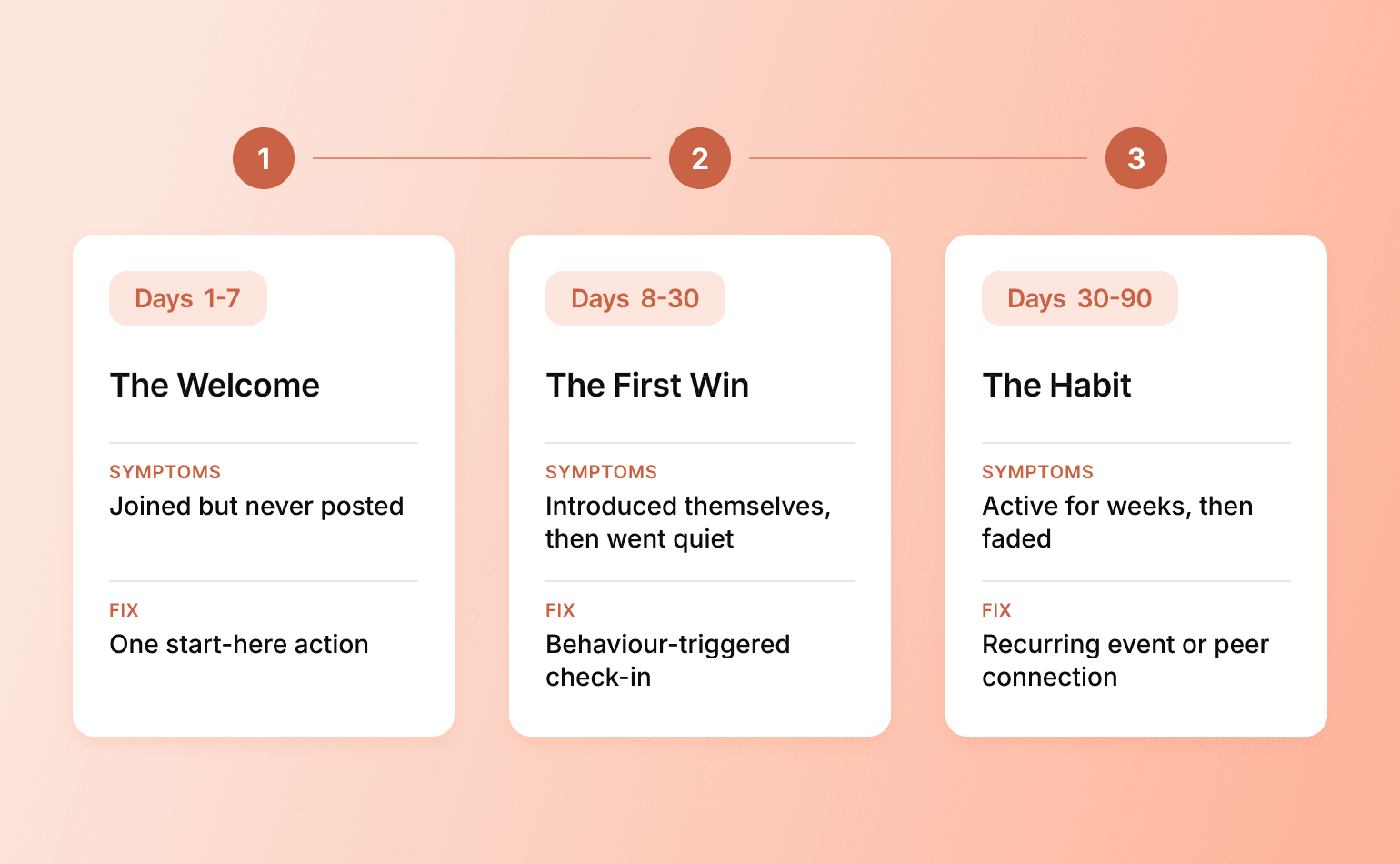
Onboarding tends to fail in one of three phases. Find which one is yours before changing anything:
- Days 1 to 7—the welcome. Symptom: new members join but never make a first post. The fix is to remove choice at the door: send them to one "start here" area with one clear action to take, rather than a tour of everything.
- Days 8 to 30—the first win. Symptom: members introduce themselves, then go quiet. They need an early payoff (an answered question, a useful resource, a reply from you), so a check-in message to anyone who's gone silent works better than another broadcast to everyone.
- Days 30 to 90—the habit. Symptom: members stay active for a few weeks, then fade—the way people often go quiet the moment they finish your course or your challenge wraps. A first win got them in the door but nothing turned it into a routine, so this is where a recurring event or a connection to other members has to take over.
Once you know which phase is failing, you don't have to keep handling it manually for every new member. And as your community grows, this becomes impossible. Thankfully, this is exactly the kind of repetitive work AI and automation do incredibly well. So instead of you chasing each person, new members move through an onboarding flow that feels personal and gives them a reason to stick around.
Workflows can send a 1:1 welcome the moment someone joins and drip the right next steps over their first weeks. You can target messages by tags or the spaces they've joined, and flag a member who's gone quiet so the right nudge goes out. Set it up once and it runs on everyone who arrives after, which frees you for the parts of running a community you actually enjoy: the conversations, the coaching, and the relationships.
Getting onboarding right (or fixing it) can pay off fast. The Roofing & Solar Reform Alliance community for roofing pros is a good model. Founder Adam Bensman spent years as a sales trainer before turning that expertise into a community—so, like you, he's the reason members showed up. The first time a member opens the app, a guided onboarding course loads automatically and a personal video welcome from Adam greets them. Every new member gets a strong first experience, and Adam never repeats the work.
3. Give members a reason to show up
Members don't go quiet because they stopped caring. They go quiet because nothing is actively pulling them back. The community sits in a browser tab they forget to open while their attention lives on their phone, in their notifications, in whatever gives them a quick hit of progress or connection.
The good news: you have real ways to earn that attention back. Putting your community in their pocket, giving them live moments worth showing up for, and showing them their own progress are the kinds of things that turn a quiet feed into a place people actually want to be.
Get onto their home screen
The home screen on their phone is the most direct line you have to a member's attention. Every community on Circle gets free iOS and Android apps. On Circle Plus, you can publish your own branded app—your name, your icon, your push notifications—so the community becomes a tap on the home screen instead of a bookmark people lose.
Felippe Nardi built a branded app for his Inside the Show community in under two weeks and used targeted push notifications to announce live sessions and replays. The result? Engagement during his next launch event doubled, and members said it changed how they took part because they could join from anywhere. Paired with email, push notifications give you a second, in-the-moment way to reach members right where they already spend their time.
Run live events people can’t wait to attend
Recurring live sessions are the strongest standing pull a community has, because they turn "I should check in sometime" into an appointment—and then, into a habit.
There are two native live formats:
- Live Rooms for interactive small-group calls of up to 30 people (coaching, office hours, hot seats) and
- Live Streams for broadcasts like workshops and Q&As.
The cadence matters more than the production value: a standing weekly call members can count on does more than an occasional polished summit (though it doesn’t hurt to do both). As the community matures, hand some of those sessions to members. When members host, they stop being attendees and start owning the place—which is exactly what keeps a community alive without you driving every session. Every session records (and transcribes) automatically, so each event also becomes on-demand content for both the people who missed it and possibly a lead magnet for prospects.
Make progress visible with gamification
In most communities, a member has no way to see that they're making progress—so showing up starts to feel optional. That's the gap gamification closes.
Points, levels, badges, and leaderboards turn ordinary participation (posting, commenting, showing up to events) into visible progress, and a well-run monthly challenge gives members a shared goal to rally around.
When you tie the rewards to behavior you actually want (helpful answers, event attendance, course completion) rather than raw post count, you're able to reinforce contribution and real engagement instead of noise. Done well, this is one of the most reliable levers for engagement there is. Done lazily, it encourages useless busywork, so point your rewards at the moments that signal a member is getting real value.
4. Run a weekly routine you can actually sustain
The trick is to split the work in two: the repetitive, predictable tasks that a tool can handle, and the high-value, human work that only you can do.
Most of the community manager day-to-day falls into the automatable bucket:
- Reminding people about events and sending recaps
- Fielding the same five questions (“Why yes, there will be a recording”)
- Flagging content for review
- Connecting members who may have something in common
Workflows and AI Agents can run all of it in the background, on every member, with you setting the guidelines and checking in here and there. The Talk Nerdy to Me membership shows what that looks like in practice. Seth David has taught accounting for decades, and today he runs 30+ on-demand courses, a membership community, and a high-ticket coaching program—which creates a lot of surface area for repeat questions. He added an AI Agent named Sandy to field those member questions automatically, so the routine support runs itself while he spends his hours coaching and teaching, the part members joined for him specifically.
What's left after the robots is the work worth protecting your time for: the coaching, the teaching, the relationships your members joined for you specifically. How often you do it is up to you, but a few things are worth making standing habits:
- Publish your recurring post: the standing thread members come back for.
- Reply thoughtfully to the most active conversations.
- Send a personal note to a member who contributed something valuable.
Predictability is what builds the return habit a fading community has lost: a Monday check-in or a Wednesday wins thread gives members a standing reason to come back precisely because they know it's coming.
Community tip: Design a system for your worst week, not your best one. In the same way that content creation can start to feel like a treadmill you’re slipping off of one tired day at a time, community engagement can occasionally start to feel the same. That’s why a single thread you never miss beats three ambitious events you abandon after a month.
5. Track what matters and adjust every quarter
A weekly routine keeps the community moving; a quarterly review tells you whether it's moving in the right direction. Three numbers are worth tracking: participation (how many members are active), activation (how many new members reach a first win), and retention (how many stick around). Every 90 days, look at all three and ask which moved the most, which didn't move at all, and what you changed last quarter that explains either.
You don't need a separate analytics tool to find those numbers. The built-in analytics dashboard pulls member activity, engagement, and revenue into one view, including data from direct messages and the mobile app that external tools can't see. Member activity scores roll each person's logins, posts, and comments into a single number, so you can spot who's active, who's at risk, and who's ready to be invited deeper without scrolling through the feed or remembering every detail yourself.
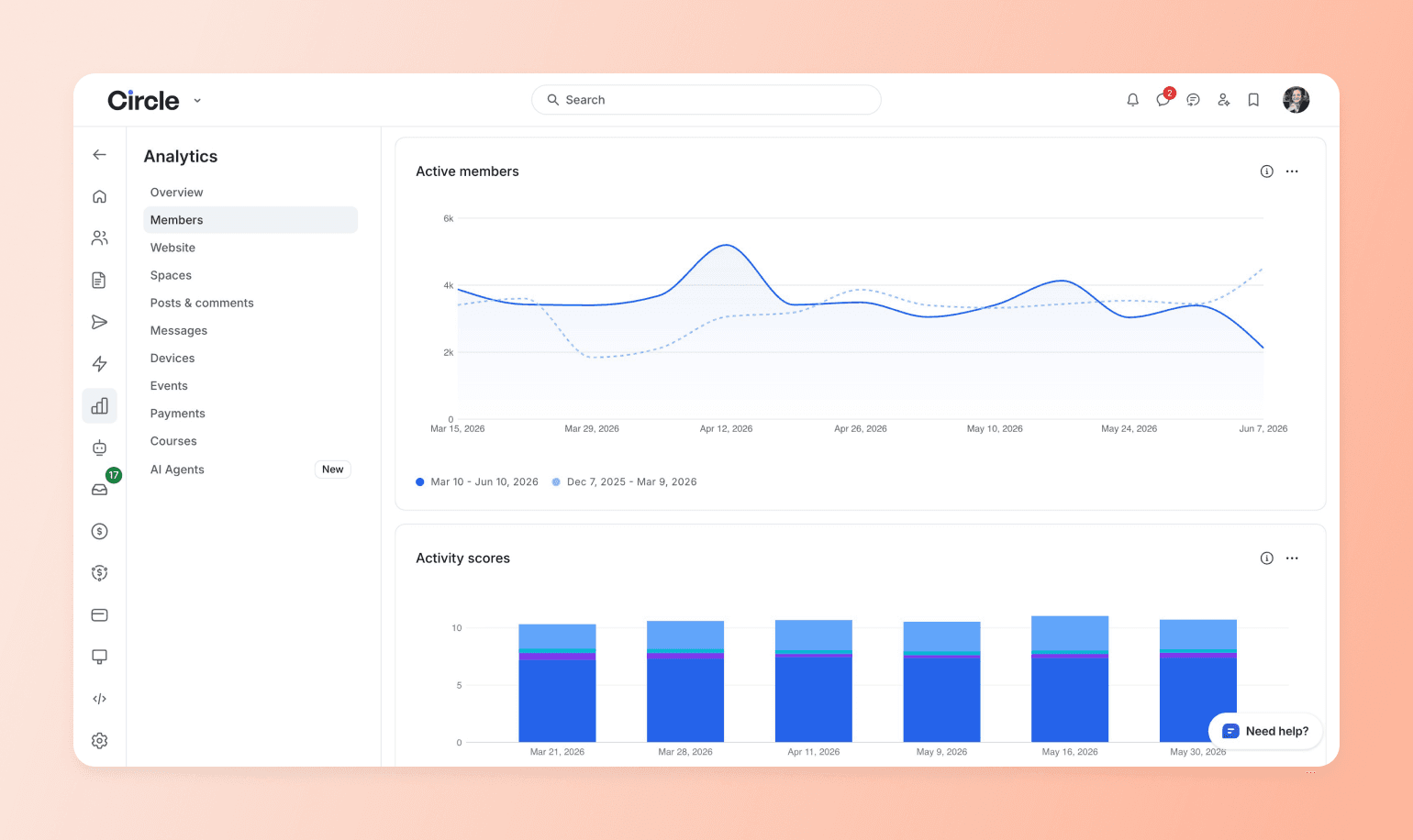
The point of the quarterly review is understanding the “why” behind the numbers, not just charting them.
For example, a rising participation rate after you launched a new weekly thread says double down on that thread. Flat activation after a month of running an onboarding workflow says the first action you're asking for is wrong, not that you need more reminders. A churn spike the month after a price change usually means the value perception slipped, not that the price did. Each pattern points at a different fix (though not a surefire one), and guessing wrong can have meaningful impacts on your business.
6. Bring it all together on one platform
Every system above gets harder to run when your community lives across four or five disconnected tools: one for discussions, one for courses, one for events, one for email. You spend more time managing the tools than managing the community, and members feel the seams: separate logins, separate apps, an experience that never quite resolves into one place.
Circle is the all-in-one platform built to fix that. Community, courses, events, payments, email, a website builder, and CRM run as one system, under your brand and on your domain, with everything the earlier sections covered (onboarding workflows, the branded app, live events, AI Agents, analytics) native in the same place. And because it's your platform rather than a social feed you're renting, no algorithm decides who sees your posts and no policy change can cut you off from the members you've brought together.
A single platform makes every other system easier. Your onboarding workflow fires on the same member data your analytics read, so you can see where people drop off and fix it in one place. Your weekly block goes faster because it's all one tab. And when you ask "which change actually moved retention?", the engagement and the revenue finally sit side by side to answer it.
Build the system, then let it run
The quiet feed you started with doesn't mean the community failed. It usually means the community outgrew being run on energy alone. Every thriving community eventually makes the same shift: from the founder personally holding it together to a set of systems that hold it together, freeing the founder to do the work that actually needs them. Put those systems in place and the community stops depending on your willpower week to week, which is the only way it ever becomes something that lasts. Circle gives you one place to build and run all of it, from spaces, events, and workflows, to AI Agents and analytics.
Want to build an exceptional community? Start your 14-day free trial of Circle now.
Managing your online community FAQ
How do I manage my community without it taking over my day?
Let automation carry the repetitive work—welcomes, reminders, the same few recurring questions—and protect your own time for what only you can do: the personal replies, the relationships, and the decisions about where the community goes next. How much time that takes depends on your community's size and pace, so build your routine around your busiest weeks, not your lightest ones, and it'll hold up when things get hectic.
Why did my community go quiet after a strong launch?
A drop-off after launch usually points to a systems gap rather than a content one. The early energy came from novelty, and without a repeatable weekly rhythm and a working onboarding funnel, there's nothing to replace it once novelty fades. Audit where new members drop off and put one recurring weekly post in place before adding anything new.
How do I know if my community is healthy?
Track three numbers monthly: participation rate, new member activation, and retention. The trend matters more than the absolute figure; if those three are holding steady or rising, your systems are working, even if the raw numbers feel modest. And if you're weighing how much a healthy community is actually worth, theCircle ROI calculator estimates the membership revenue an audience your size could realistically generate, using real conversion and retention data from communities on the platform.
When should I start using AI to manage my community?
Start with one or two repetitive tasks, like drafting welcome messages or answering common member questions, and review the output before it goes live. Add more AI Agents or automated workflows as you get comfortable with the quality, keeping the relationship and judgment work with you.
How often should I ask members for feedback?
Quarterly works well for most communities. Run a short survey or open thread, then visibly act on what you learn, and members trust the process when they see their input reflected in real changes.
Community Content Marketer
Arina is Circle’s community content marketer, sharing insights on community growth, GTM strategy, and storytelling for solopreneurs.