The best AI tools for managing online communities
TL;DR
- Seven AI functions take the repetitive work off a community builder’s plate: moderation, member-facing AI Agents, onboarding, engagement workflows, summaries and transcription, content help, and activity scoring.
- They only pay off if your AI shares one platform with your courses, payments, and community; otherwise, you're stitching data across tools by hand.
- Of the five AI community management tools coaches, creators, and educators evaluate (Circle, Kajabi, Skool, Mighty Networks, Discord), Circle is the one that covers all seven functions natively on one platform.
You've got the members, and you're showing up every day. People are posting, asking questions, and joining your live sessions. But you're drowning in the same five questions, the welcome DMs to every 2 a.m. signup, and the slow drip of folks going quiet before you notice.
Running a community at scale without burning out is one of the hardest leaps creators, coaches, and educators make. It used to mean you had to start thinking about scaling your team through hiring. Now, it’s why creators turn to AI community management tools to manage the overload of repetitive tasks, allowing them to focus on their members.
So, what should you be looking for if you want to make the move?
Here are the seven AI functions that take the repetitive work off your plate, and the five tools most often evaluated for delivering them.
The 7 AI features that help manage a community
The tasks that used to eat a community manager's day—moderating posts, welcoming new people, answering the same five questions, and chasing the folks who've gone quiet—can now be handled by seven AI functions. Here's the short version of each:
- Moderation: flags, hides, or removes rule-breaking content automatically and sends edge cases to you, so you're not reading every post yourself.
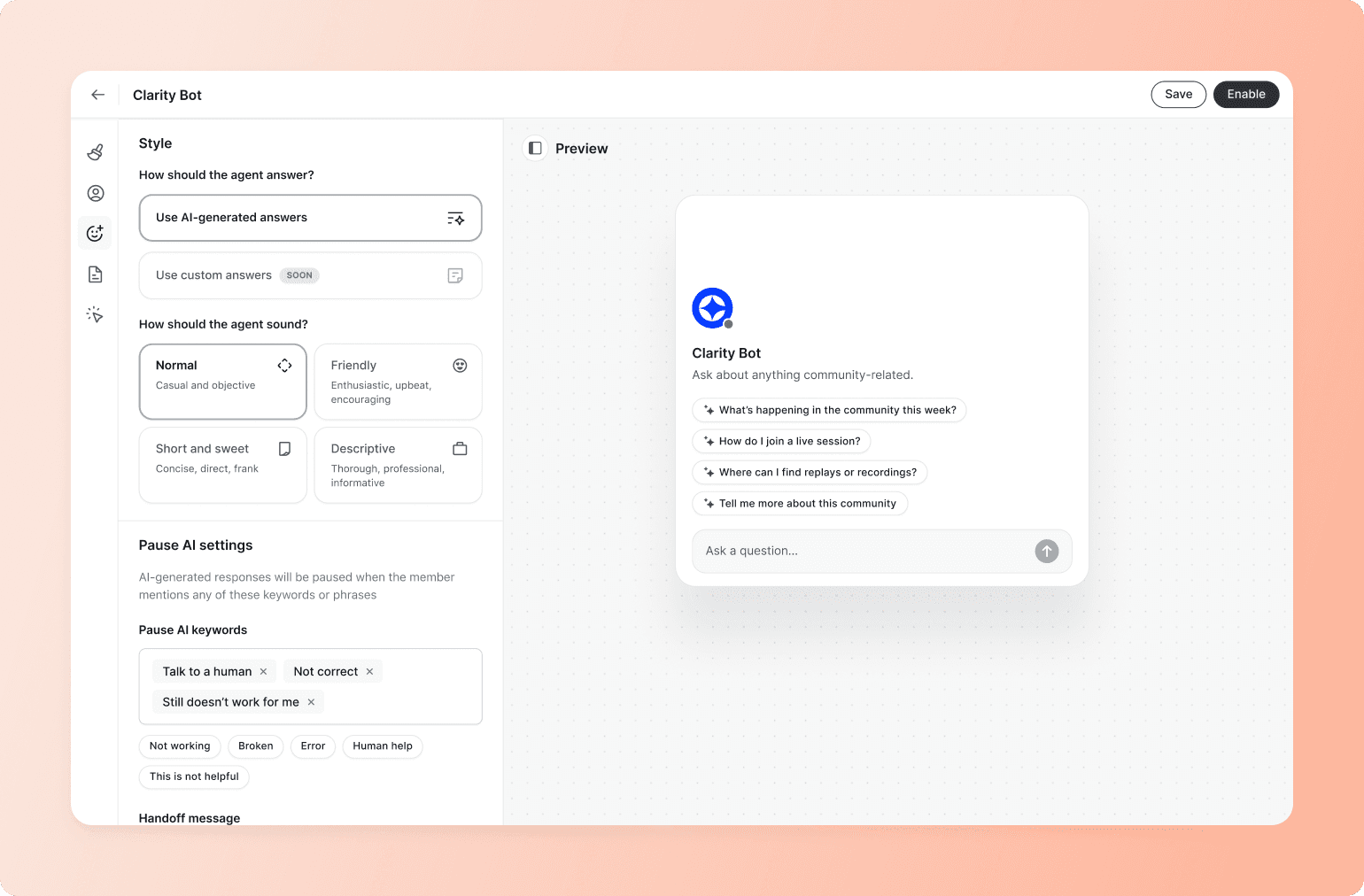
- Member-facing agents: trained on your content, they answer frequently asked questions, point members to resources, and offer coaching-style support between live sessions.
- Onboarding workflows: walk new members through their first actions, introduce them to others, and surface the right resources, without you DMing for every signup.
- Engagement workflows: react to what members actually do (e.g., finishing a module or going quiet for two weeks) instead of running on a generic drip schedule.
- Summaries and transcription: turn long threads and recorded events into searchable takeaways members can find months later.
- Content assistance: drafts the discussion prompts, event recaps, and course follow-ups you'd otherwise be writing at midnight.
- Activity scoring and analytics: flags the members about to disappear (skipped events, fewer posts, stalled course progress) so you can reach out before they go.
You can see what that looks like in practice with Adam Bensman's Roofing & Solar Reform Alliance, which has grown to 2,800+ members across 350 companies by auto-loading a guided onboarding course the moment a new member opens the branded app.
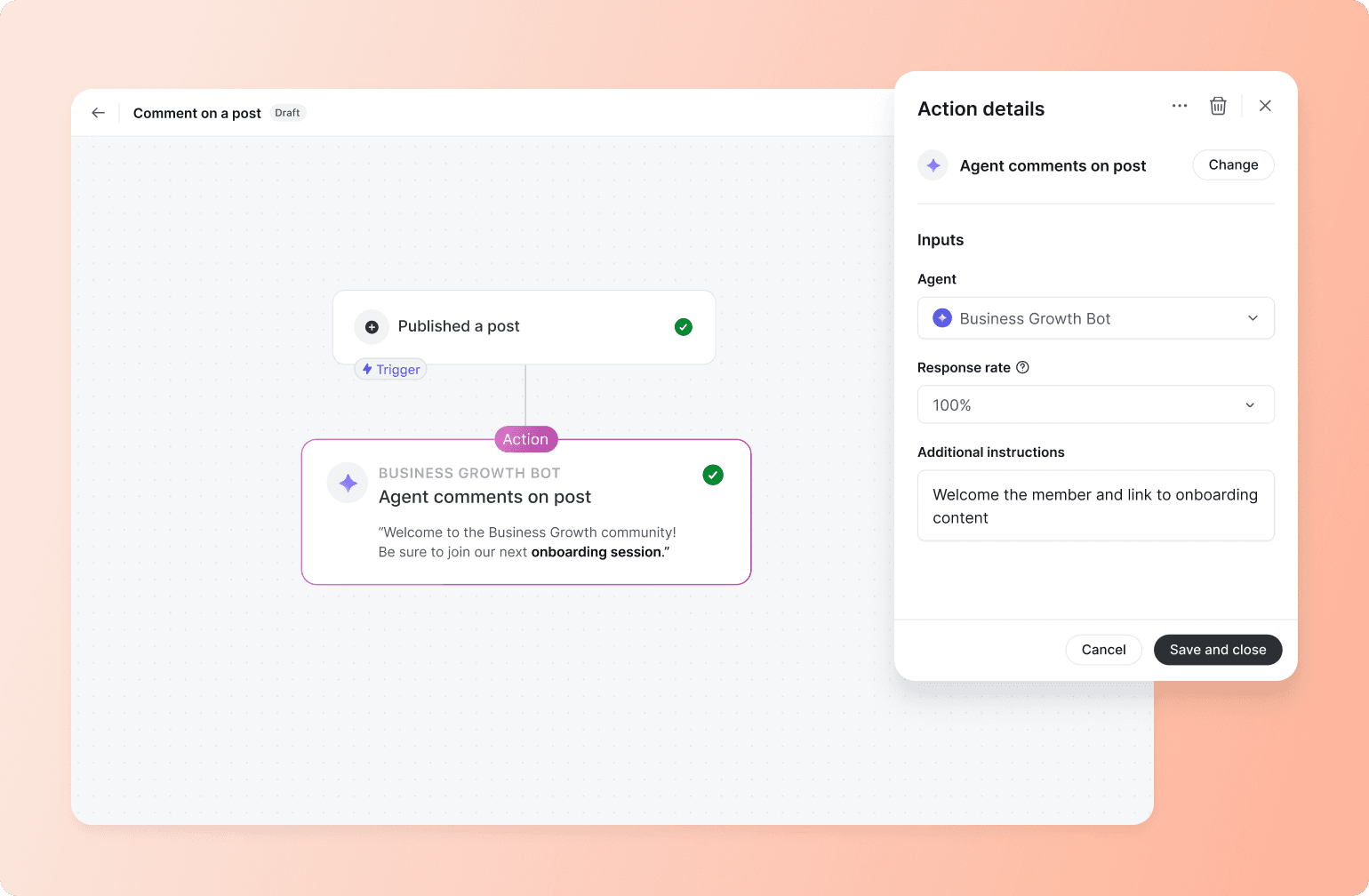
From there, the AI runs role-based spaces for owners, managers, and sales teams, and uses weekly live sessions to keep people coming back; a setup that's now driving 39% monthly active users (MAU) and the lowest churn Adam has seen in eight months.
But every one of these functions only works if your AI shares member data. A moderation bot that doesn't know which community someone belongs in can't moderate in context, and an onboarding agent that doesn't know what someone paid for can't recommend the right next step.
So the real question isn't "does this tool have AI?"; it's "does the AI sit on the same platform as everything else?"
Here's how the five best AI-powered tools compare.
The 5 best AI platforms for managing online communities
Of the five tools coaches, creators, and educators evaluate—Circle, Kajabi, Skool, Mighty Networks, and Discord—Circle is the one that covers all seven AI functions natively, on a shared platform. The others handle one or two pieces well and leave you bolting on third-party tools for the rest.
Here's how they stack up, with the pros and cons that matter most when you're choosing where to build.
1. Circle: the full AI stack for community builders
Circle is an all-in-one community platform that brings AI, courses, events, payments, emails, member CRM, and community discussion under one login.
Because everything sits on the same foundation, you keep engagement and community quality high, and admin low:
- The onboarding agent knows which space a member belongs in
- The moderation workflow keeps the feed high-value and makes questions easy to search
- A course agent helps students study with your real course content, and
- Engagement workflows encourage course progress, event RSVPs, or post activity.
It's the best fit for paid communities, course creators, coaches, and education businesses who'd rather have AI, automation, courses, and community running on one platform than duct-tape platforms and a separate AI bot together.
What sets Circle apart is that you can use AI internally with Copilot, Inbox, Agents, and Workflows—or externally by connecting to the MCP—all running natively on the same platform that powers your courses and payments.
Pros of Circle
Scale your expertise without scaling your hours
- Member-facing AI Agents trained on your community content, with up to 10 customizable Agents per community and separate roles for onboarding, coaching, and support.
- Tiered Agents by membership level: give free or beginner members access to a limited agent that doesn't expose information from premium tiers.
- AI Copilot for admins acts as your in-platform assistant, drafting posts, summarizing threads, and surfacing the next best action without leaving Circle.
- Native course infrastructure with AI teaching assistants trained on your content, video completion requirements, sequential progression, and auto-generated transcripts that your AI Agents can search.
- Circle MCP connects your community data to external AI tools (like Claude or ChatGPT), so you can query members, posts, and activity from the AI assistant you already use.
Run the community without being on call
- AI Inbox gives admins a single place to monitor every member-Agent conversation, with one-click takeover and pause AI keywords so you stay in control when it matters.
- Doubles as a research layer: downloadable conversation logs show what members actually ask outside of public posts and Q&As.
- Email Hub for broadcasts, automated sequences, and behavior-triggered emails (joins, purchases, RSVPs, course completions) running on the same member data as the community.
- Auto-transcription, AI summaries, and activity scoring are built in, so long threads, recorded events, and live streams all become searchable.
Own the platform and control the experience
- Branded app on iOS and Android puts your community on members' home screens.
- You own the platform: no algorithms throttling your reach, no surprise bans, no community deleted overnight.
Cons of Circle
- The full AI suite (especially AI Agents and AI Workflows) sits on Circle Plus, not the entry-tier plans
- AI Agent quality depends on how well you've structured your content and spaces
- Lighter use cases may not need the full stack

20K+ digital businesses live on Circle
2. Kajabi: strong on content, light on member-facing chat
Kajabi has leaned into AI for content creation and for parts of student engagement, especially after its "Evolved" update. But the AI mostly works on marketing copy, business strategy, courses, and emails, not on member-to-member conversations, so it doesn't share a platform with the community feed itself.
Pros of Kajabi
- Cofounder, a context-aware AI assistant that can act on business data across the platform, comes with every Kajabi plan
- Evolved automations cover milestone emails, review requests, inactivity alerts, bonus unlocks, and smart tagging
- AI-powered video dubbing, transcripts, and translations across courses, websites, and landing pages
- Comment-to-DM automation cuts down the need for tools like ManyChat
- A long-standing all-in-one stack for courses, coaching, podcasts, and community
Cons of Kajabi
- AI is admin- and content-focused, so member-facing conversational AI Agents aren't a core part of the suite
- No published equivalent of an admin AI inbox with human override
- Community moderation—the management task that often eats up the most time—runs on traditional tools
- Pricing went up under the Evolved update: Cofounder is on every plan, but Creator Studio and the deeper AI features start at the Basic tier ($143/month) and up
- Some creators say AI text and auto-clipped video output are inconsistent
Kajabi vs. Circle: See how Kajabi stacks up against Circle.
3. Skool: simple to start, no native AI
Skool's design philosophy is simplicity: a community feed, classroom, calendar, gamification, and payments, kept deliberately minimal. That keeps the platform clean, but any AI you want to add lives entirely outside the platform.
Pros of Skool
- A clean, distraction-free interface that gets new members posting fast
- Gamification (points, leaderboards, levels) drives daily participation by default
- Built-in payments and a public discovery directory that can pull members in
- Low entry pricing and a single flat plan that's easy to understand
Cons of Skool
- No native AI features for moderation, member-facing agents, or content help, so third-party tools live outside the platform
- No member requests for a built-in AI trained on classroom content are still on the public feature wishlist
- No native email marketing, automation workflows, or CRM integrations
- Limited customization, no custom domains, and basic course-building features
- Not built for advanced LMS use cases, complex automations, or branded mobile experiences
Skool vs. Circle: See how Skool stacks up against Circle.
4. Mighty Networks: AI for the host, not the members
Mighty Networks built AI Cohost on its proprietary Community Design framework, with a focus mostly on host-side strategy and content prompts. It's useful for planning your community, but the AI never reaches, guides, or supports its members.
Pros of Mighty Networks
- AI Cohost helps with community naming, course outlines, landing pages, monthly themes, and pricing recommendations.
- Writing assistant, Profile Assist, conversation starter suggestions, and icebreaker question prompts
- Member re-engagement suggestions pulled from the member list
- A "Similarities" feature shows shared interests between members to spark a connection
- AI Cohost is on every plan, starting on the entry-tier Launch Plan
- Native iOS and Android apps, with branded apps on higher plans
Cons of Mighty Networks
- AI is mostly admin- and host-facing, so member-facing AI is limited compared to platforms with dedicated member-trained agents
- No published equivalent of a unified AI inbox with human override across member conversations
- Workflow automation and engagement depth scale with higher tiers
- Course-building depth and integrations are lighter than dedicated LMS-first platforms
Mighty Networks vs. Circle: See how Mighty stacks up against Circle.
5. Discord: free chat with everything else added-on
Discord is a free chat platform with native moderation tooling. Still, the AI ecosystem lives almost entirely in third-party bots, meaning every AI capability sits on a different platform than the next.
Pros of Discord
- AutoMod blocks messages before they're posted using keyword filters, mention spam thresholds, and a model-driven spam filter
- A large third-party bot ecosystem extends moderation, FAQ, and engagement features
- Real-time chat, voice, and video are core to the experience
- Free for most use cases, with a deep developer API for custom builds
Cons of Discord
- No native member-facing AI Agents trained on your content, so every advanced AI capability needs a third-party bot bolted on
- No native course infrastructure, payments for memberships, or unified member CRM
- Member data is scattered across bots, so no shared platform powers AI moderation, support, and engagement together
- You don't own the platform, so Discord can suspend servers, change the rules, or update the experience without your input
- Branding is limited, since the experience always lives inside the Discord app
Discord vs. Circle: See how Discord stacks up against Circle.
Looking at the five together, most tools give you one or two of the seven AI functions, and almost none of them on a shared platform. Circle is the one that covers the full stack natively, without third-party bots.
Run your community on one AI-powered platform
AI only saves you time when it can see the same member data your courses, payments, and community already use. When moderation, onboarding, support, and engagement all run on one source of truth, AI can take the repetitive work off your plate, so you can focus on what your members actually pay for.
That's exactly what Circle is built for. Your community, courses, events, payments, emails, and member CRM live under one login—so member-facing AI Agents, AI Workflows, contextual moderation, and activity scoring all run on the same record. Less tool sprawl, fewer tabs, and an AI that actually knows who your members are.
Start your 14-day free trial of Circle now to see what leading your community with AI feels like.
AI tools for communities FAQ
Where should I start with AI in a paid community?
It depends on what's currently blocking your growth. A community drowning in moderation has different starting points than one losing members to weak onboarding or to support questions on repeat. Look at where the bottlenecks are (response time, retention, content output, or engagement drop-off) and start with the AI functions that hit those gaps before layering on more automation.
How long does it take to train an AI Agent on my content?
It depends on how organized your content already is. If your courses, posts, and FAQs live in one place (like a single community platform), you can have a working agent up in an afternoon. But if your content is scattered across Notion, Google Docs, a separate LMS, and old email threads, you'll spend most of the time consolidating before the AI can actually learn anything useful, because the agent's quality is only as good as the source material you point it at.
What happens if the AI gets something wrong?
The good ones let you stay in the loop. Look for a member-facing AI inbox with one-click human override, so when an AI Agent's answer is off, you can take over the conversation mid-thread, send the right reply, and let the AI learn from the correction. Without that, a wrong answer just sits there until a member flags it.
How do I pick an AI community management tool without regretting it later?
Three things to check.
One: Do the functions above run natively, or do you need third-party tools bolted on?
Two: Do they share the same member data across moderation, support, onboarding, and engagement?
And three: does the tool actually fit your business model (paid courses, coaching, memberships) or is AI a side feature on a chat-first product?

Head of Performance Marketing
Marcus is the Head of Performance Marketing at Circle—and Circle's main demand gen nerd.