Circle vs. website community plugins: An honest comparison
TL;DR
- A WordPress community plugin is a fine choice for a content-first site, or when you have a developer.
- It gets fragile and slow once members are the point, and you're the one maintaining it.
- You don't have to leave WordPress: keep your site for content and run the community on Circle, connected by a link, single sign-on or an embed.
If you already run your site on WordPress, Webflow or another site builder, adding a community plugin feels like the obvious next step. You keep your site, your content and your control. Plenty of people do it, and for a content-first site it can work.
But when you're a solo coach, educator or creator building an audience around what you know, the community is the part that tends to break. Plugins conflict after an update. The site slows down when new members log in. And because there's no team behind it, you're the one who fixes it, usually at the exact moment you'd rather be teaching or selling.
About 1 in 16 people we spoke to over the past year mentioned running on WordPress or a plugin. This is an honest look at when that setup is enough, where it gets fragile, and how to add a community to your website, whether it's on WordPress or Webflow, without becoming its full-time maintainer.
WordPress plus a plugin vs. Circle at a glance
| WordPress + community plugin | Circle | |
|---|---|---|
| Best for | Content-first sites, blogs and sites with a developer on hand | Running a community, courses, events and paid access in one place |
| Community | Added by a plugin on top of your site | Built in from the start |
| Members and logins | Your site and the plugin each keep their own, and you keep them in sync | One member system |
| Payments, email and courses | Separate plugins or tools, each with its own setup | Built in. Email is included, and Email Hub is an optional paid add-on |
| Updates and security | Yours to manage and test | Handled for you. Every security update we make to Circle reaches your community too |
| When something breaks | You, your host or a developer | Circle's support team |
| Time to set up | Depends on how many pieces you assemble | Hours to a first live community, and you can build it with Circle AI |
When a WordPress plugin is enough
WordPress is very good at what it was built for: publishing. If your blog and your search traffic are the engine of your business, keep them there. Moving a site that ranks is a risk with little upside.
A WordPress community plugin is also a reasonable choice if:
- Content comes first, and the community is a small extra for a handful of members.
- You have a developer, or you enjoy this kind of work, and updates don't worry you.
- Your members already live on your site and don't need a separate place to talk.
- You want full control over every piece and are happy to own every piece.
If that's you, you don't need to switch. The trouble starts when the community stops being a side feature and becomes the thing your members come for.
What's actually different: fragile, slow, and you're the maintainer
The core difference is that a plugin adds community to your site, while a community platform is built around the community. That shows up in three places.
It's fragile
Your community plugin, your membership plugin, your course plugin and your email tool all update on their own schedules. When two of them disagree, something stops working, and it's rarely the thing you were updating. One small-business owner we spoke with sells training courses on WordPress with LearnDash. Students intermittently get stuck on quizzes and have to reach out because they can't move on, and he can't tell whether it's a firewall or one of his plugins. With that many plugins, he's learned he can break something just by touching it. Fixing it takes time you didn't budget for.
It's slow when it matters
A WordPress site that handles a blog comfortably can struggle once a hundred new members start logging in, posting and loading profiles. Some people end up moving the member area off the main site to protect it, which means running two systems instead of one.
You're the maintainer
There's no support team for the combination you've built. The host, the theme, each plugin and the payment tool each have their own support, and none of them owns the whole stack. Even a free plugin carries development costs, and a stack someone else built for you becomes a job to keep running. Income School's founder, a self-described content creator rather than a web developer, had developers spend a year on a rebuild that never got finished before he moved the business to Circle.
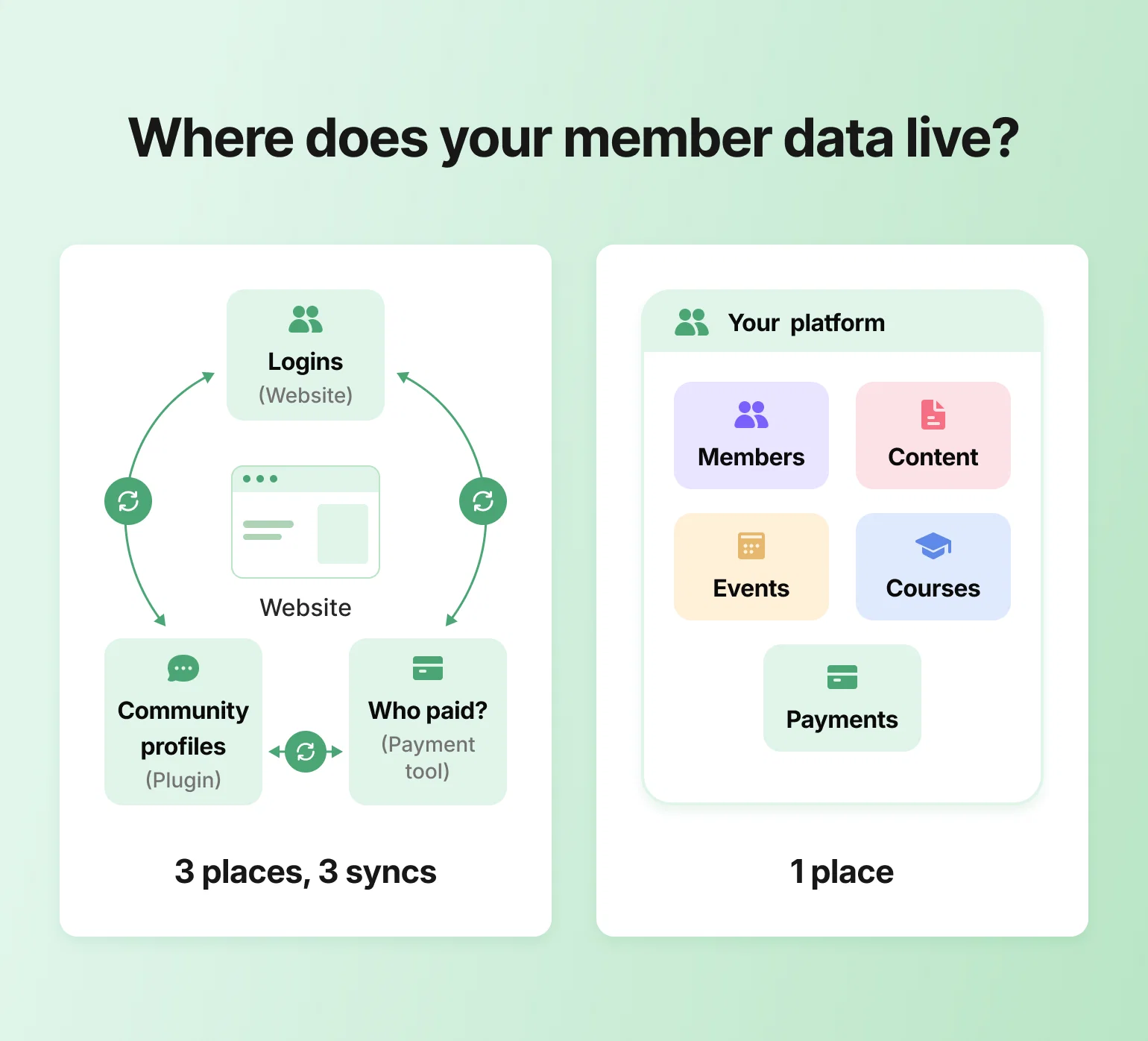
Underneath all three is the same thing: your member data lives in more than one place. WordPress has your logins, the plugin has your community profiles, and your payment tool has who paid. Keeping them in sync is the work nobody mentions at the start. It's also why so many people end up with content on one tool, community on another, events on a third, and a group chat on the side, and then look for one place to bring it together.
A native community platform doesn't have that problem, because members, content, events, courses and payments share one system from the start. Circle also lets you build your external site and your community in one place, because the website builder and the community share the same members and logins.
Can it live on my site?
The question we hear most from WordPress users is whether they have to give up their site to use a community platform. They don't. There are four ways to connect the two, from easiest to most involved:
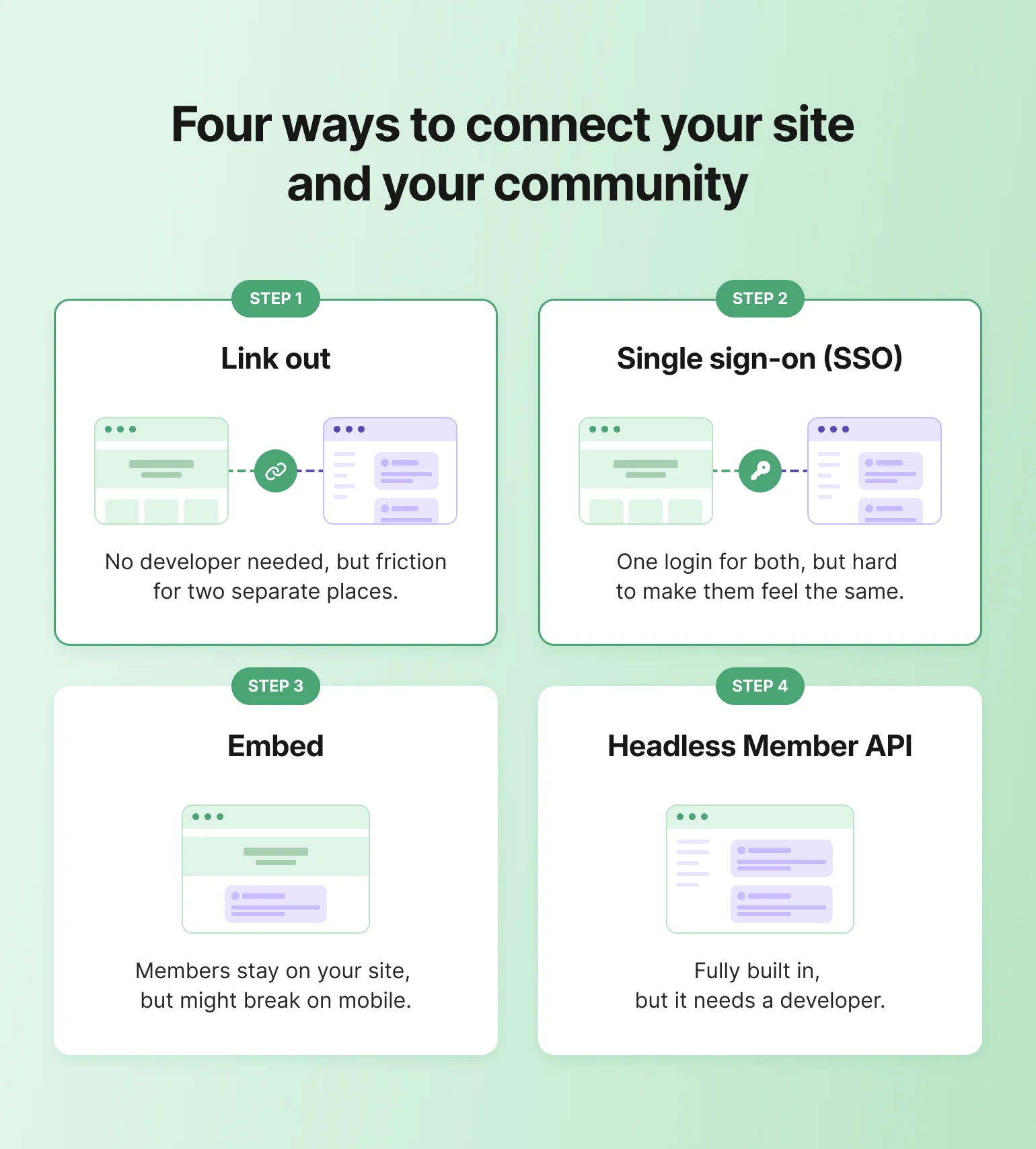
- Link out. Keep your WordPress site for content and put your community on a custom domain you own, so members find it at your own address. Custom domains are available from the Professional plan. Your blog and search traffic stay exactly where they are.
- Single sign-on. Members log in once. Circle supports WordPress single sign-on, so your site and your community can share a login.
- Embed. You can embed your community on a page of your own site, so members stay inside your site while the community runs on Circle.
- Build it into your own product. If you have a developer, Circle's Headless Member API lets them build the community into your own app or site. It's available on the Business plan and above, and someone has to build the front end and a server-side sign-in flow, so it's an option for teams with developer time, not a shortcut for a solo creator.
For most solo coaches, educators and creators, the first or second option is the right one: keep what's working on WordPress and let the community run somewhere built for it. For SEO, keep your blog where it ranks and link to the community from there.
Not on WordPress? The same logic applies if you're adding a community to a site on Webflow, Wix, Squarespace or another builder. Linking out to a community on a custom domain you own works with any site, and the embed option puts the community on a page of your site wherever you can add embed code. Single sign-on is the WordPress-specific one.

Keep your site. Add the community.
Or build the site on Circle. If you'd rather not connect two systems at all, Circle's website builder lets you build and publish pages with drag-and-drop blocks and no code, and show visitors control who sees each page: open to anyone (with optional password protection), members only, or limited to specific access groups. Because the pages and your community share the same members, a page can be public for visitors and private for members, with no second login. Circle AI can build a page from a text description, or recreate one from a URL, a screenshot or an uploaded design, and it shows a live preview before anything goes live. It's available on all Circle plans.
When to move, and what the stack really costs in hours
The sticker price of a DIY stack can look lower than a platform subscription. The cost people underestimate is hours. Every piece below is something one person sets up once and then keeps working:
| Piece | Setup | Ongoing |
|---|---|---|
| Domain and hosting | Pick, buy and connect them | Renewals, backups, security, speed |
| Choose a sender, authenticate it, avoid spam folders | Deliverability, list hygiene | |
| Payments | Connect a processor and a membership plugin | Failed payments, refunds, access that doesn't update |
| Community plugin | Install, configure, style | Updates, conflicts with other plugins |
| Courses and content | Add a course plugin and gate access | Compatibility with the rest |
| Keeping it in sync | Connect logins, members and payments | Fix what drifts apart |
It's time to move when:
- You sell memberships to something, not content to your readers.
- A plugin update has broken something more than once.
- The site feels slow when members join or post.
- You're tracking members, payments and events in different places.
- You'd rather answer members than debug the site.
That last point matters most for people running a business on their own. Every hour spent on plugin conflicts is an hour not spent on the people you set out to teach, coach or serve. If you decide to move, Circle offers free concierge migration for courses, payments and email, depending on your plan.
Spend your hours on your members, not your plugins
WordPress and a community plugin can carry a content-first business a long way, and you don't have to leave it to add a community. The honest question is where your hours go. If they're going to updates, conflicts and keeping logins in sync, you're maintaining a stack instead of serving the people you built it for.
If that sounds familiar, try running your community on Circle next to your existing site. You can keep your blog where it ranks, connect your login, and see how it feels when members, courses, events and payments live in one place.
Spend your time on members, not site builds.
FAQs
How do I add a community to my website?
There are three common routes. If your site runs on WordPress, you can install a community plugin. You can also link out to a separate community on a domain you own, or embed a community on a page of your site. A plugin keeps everything on one site but makes you responsible for updates, while linking out and embedding keep the community on a platform built for it.
How do I add a community to Webflow?
Most site builders, Webflow included, focus on building the site rather than running a community, so people usually add one by linking out to a community on their own domain or by embedding it on a page of the site. Linking out works with any site builder, and embedding works wherever you can add embed code. Choose based on whether members should stay on your site or can go to a separate address.
What is the best community plugin for WordPress?
It depends on what your community is for. Roundups most often feature BuddyBoss, FluentCommunity, bbPress and wpForo, and the right pick comes down to whether you need a simple forum or a full membership community with courses and events. Whichever WordPress community plugin you choose, check how it handles logins, payments and updates alongside your other plugins, because that is where most of the ongoing work comes from.
Can I add a community to WordPress without a developer?
For a small setup, yes. Installing a WordPress community plugin doesn't take a developer, but keeping it working alongside your membership, course and email plugins often does. If you connect WordPress to a community platform such as Circle instead, linking out needs no developer and WordPress single sign-on follows a step-by-step guide, while building the community into your own site with the Headless Member API does need one.
Why does my WordPress site slow down when members join?
A blog serves mostly the same pages to everyone, so it caches well. A member area serves logged-in people their own pages, profiles and posts, which are harder to cache, so the same hosting works harder as more members are active at once. Better hosting and caching can help, and some people move the member area off the main site to protect it.
What usually breaks in a WordPress community plugin?
Most problems come from plugins updating out of step: conflicts between the community, membership and course plugins, slowdowns when many members are active, and logins or payments that fall out of sync.
Is a WordPress community plugin cheaper than Circle?
In cash, a DIY stack can look cheaper. The difference is the time to set it up, keep it updated and fix it when something breaks, which falls on you.
Is WordPress still worth using for a business site in 2026?
Yes, for publishing. WordPress is still a strong choice for a blog or a content-first site, especially when search traffic drives your business. The open question is the community: a plugin adds it on top of your site, and you take on the updates and fixes that come with that.

Head of Performance Marketing
Marcus is the Head of Performance Marketing at Circle—and Circle's main demand gen nerd.